Introduction :
Window Fone 7 là một HĐH chạy trên Smart Fone, cho đến nay WP7 đã được rất nhiều người trên thế giới rất yêu thích, bởi nó mang lại một trãi nghiệm người dùng mới, với những hiệu ứng cực kỳ đẹp mắt và thú vậy.
Về mặt ứng dụng, các bạn dễ dàng phát triển ứng dụng với các ngôn ngữ như C#,VB, C++ …
Để phát triển một ứng dụng cho WP7 các bạn phải cài đặt những tool sau :
- Visual Studio 2010 Express for Windows Phone
Windows Phone Emulator
Silverlight for Windows Phone
XNA Game Studio 4.0
Expression Blend 4 for Windows Phone

Create Window Fone Application :
Fire up Visual Studio 2010 and Create Window Fone Application :
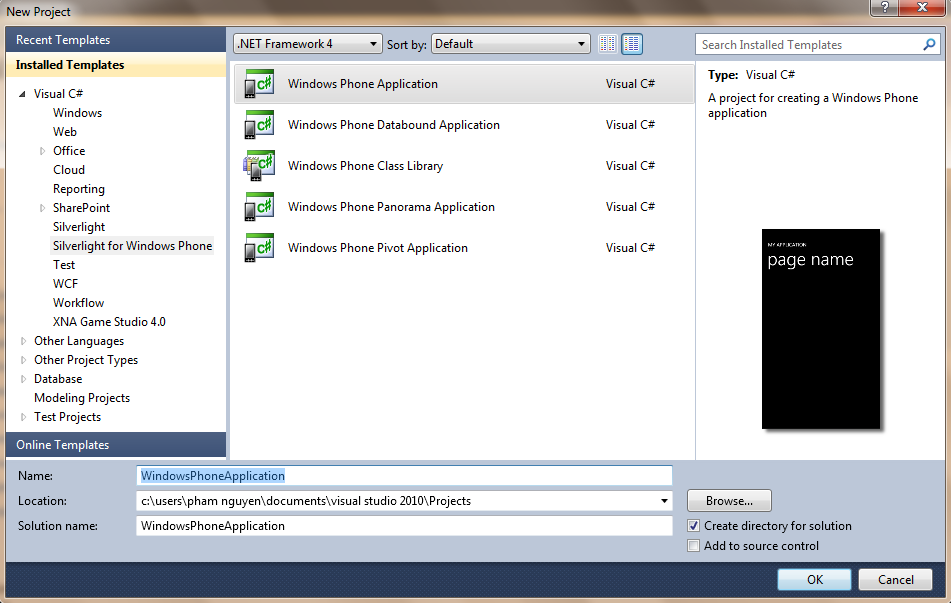
Tiếp theo các bạn dùng Expression Bend 4 để Design giao diện cho ứng dụng
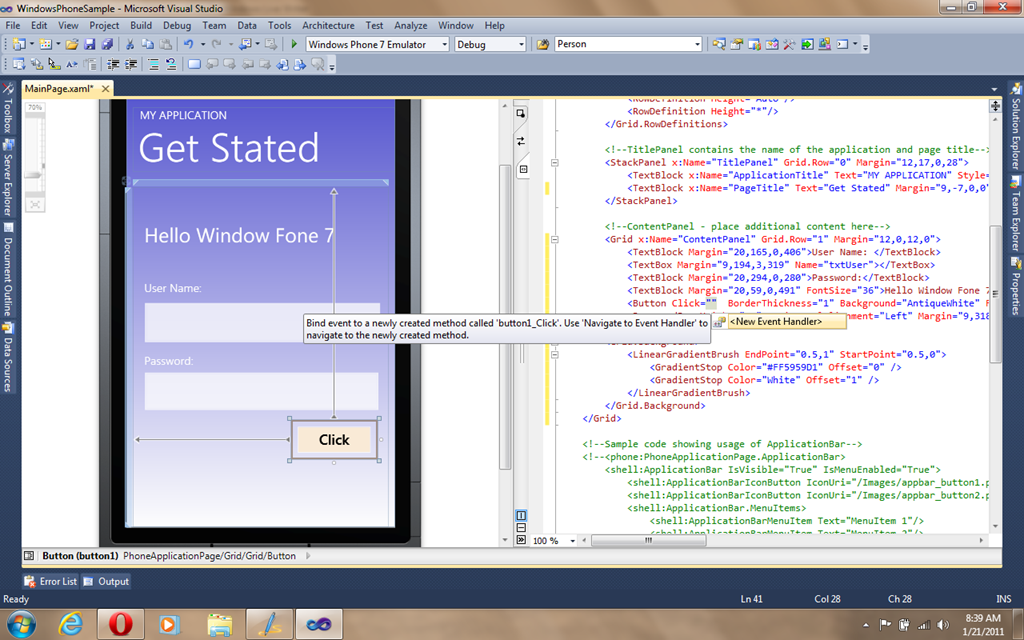
Sau đây là Code XAML ứng dụng :
1: <phone:PhoneApplicationPage
2: x:Class="WindowsPhoneSample.MainPage"
3: xmlns="http://schemas.microsoft.com/winfx/2006/xaml/presentation"
4: xmlns:x="http://schemas.microsoft.com/winfx/2006/xaml"
5: xmlns:phone="clr-namespace:Microsoft.Phone.Controls;assembly=Microsoft.Phone"
6: xmlns:shell="clr-namespace:Microsoft.Phone.Shell;assembly=Microsoft.Phone"
7: xmlns:d="http://schemas.microsoft.com/expression/blend/2008"
8: xmlns:mc="http://schemas.openxmlformats.org/markup-compatibility/2006"
9: mc:Ignorable="d" d:DesignWidth="480" d:DesignHeight="768"
10: FontFamily="{StaticResource PhoneFontFamilyNormal}"
11: FontSize="{StaticResource PhoneFontSizeNormal}"
12: Foreground="{StaticResource PhoneForegroundBrush}"
13: SupportedOrientations="Portrait" Orientation="Portrait"
14: shell:SystemTray.IsVisible="True">
15:
16: <!--LayoutRoot is the root grid where all page content is placed-->
17: <Grid x:Name="LayoutRoot">
18: <Grid.OpacityMask>
19: <LinearGradientBrush EndPoint="0.5,1" StartPoint="0.5,0">
20: <GradientStop Color="Black" Offset="0" />
21: <GradientStop Color="White" Offset="1" />
22: </LinearGradientBrush>
23: </Grid.OpacityMask>
24: <Grid.RowDefinitions>
25: <RowDefinition Height="Auto"/>
26: <RowDefinition Height="*"/>
27: </Grid.RowDefinitions>
28:
29: <!--TitlePanel contains the name of the application and page title-->
30: <StackPanel x:Name="TitlePanel" Grid.Row="0" Margin="12,17,0,28">
31: <TextBlock x:Name="ApplicationTitle" Text="MY APPLICATION" Style="{StaticResource PhoneTextNormalStyle}"/>
32: <TextBlock x:Name="PageTitle" Text="Get Stated" Margin="9,-7,0,0" Style="{StaticResource PhoneTextTitle1Style}"/>
33: </StackPanel>
34:
35: <!--ContentPanel - place additional content here-->
36: <Grid x:Name="ContentPanel" Grid.Row="1" Margin="12,0,12,0">
37: <TextBlock Margin="20,165,0,406">User Name: </TextBlock>
38: <TextBox Margin="9,194,3,319" Name="txtUser"></TextBox>
39: <TextBlock Margin="20,294,0,280">Password:</TextBlock>
40: <TextBlock Margin="20,59,0,491" FontSize="36">Hello Window Fone 7</TextBlock>
41: <Button Click="button1_Click" BorderThickness="1" Background="AntiqueWhite" Foreground="Black" Content="Click" Height="70" HorizontalAlignment="Left" Margin="282,415,0,0" Name="button1" VerticalAlignment="Top" Width="154" />
42: <PasswordBox Height="91" HorizontalAlignment="Left" Margin="9,318,0,0" Name="passwordBox" VerticalAlignment="Top" Width="441" />
43: </Grid>
44: <Grid.Background>
45: <LinearGradientBrush EndPoint="0.5,1" StartPoint="0.5,0">
46: <GradientStop Color="#FF5959D1" Offset="0" />
47: <GradientStop Color="White" Offset="1" />
48: </LinearGradientBrush>
49: </Grid.Background>
50: </Grid>
51:
52: <!--Sample code showing usage of ApplicationBar-->
53: <!--<phone:PhoneApplicationPage.ApplicationBar>
54: <shell:ApplicationBar IsVisible="True" IsMenuEnabled="True">
55: <shell:ApplicationBarIconButton IconUri="/Images/appbar_button1.png" Text="Button 1"/>
56: <shell:ApplicationBarIconButton IconUri="/Images/appbar_button2.png" Text="Button 2"/>
57: <shell:ApplicationBar.MenuItems>
58: <shell:ApplicationBarMenuItem Text="MenuItem 1"/>
59: <shell:ApplicationBarMenuItem Text="MenuItem 2"/>
60: </shell:ApplicationBar.MenuItems>
61: </shell:ApplicationBar>
62: </phone:PhoneApplicationPage.ApplicationBar>-->
63:
64: </phone:PhoneApplicationPage>
Tiếp theo chúng ta Thêm Sự kiện cho nút Click :

Các bạn Open file MainPage.XAML.cs để xử lý sự kiện cho ứng dụng:
1: using System;
2: using System.Collections.Generic;
3: using System.Linq;
4: using System.Net;
5: using System.Windows;
6: using System.Windows.Controls;
7: using System.Windows.Documents;
8: using System.Windows.Input;
9: using System.Windows.Media;
10: using System.Windows.Media.Animation;
11: using System.Windows.Shapes;
12: using Microsoft.Phone.Controls;
13:
14: namespace WindowsPhoneSample
15: {
16: public partial class MainPage : PhoneApplicationPage
17: {
18: // Constructor
19: public MainPage()
20: {
21: InitializeComponent();
22: }
23:
24: private void button1_Click(object sender, RoutedEventArgs e)
25: {
26: MessageBox.Show("User : " + txtUser.Text + "\n" +
27: "Password : " + passwordBox.Password);
28: }
29: }
30: }
Còn đây là Kết quả Sau khi chúng ta chạy ứng dụng :
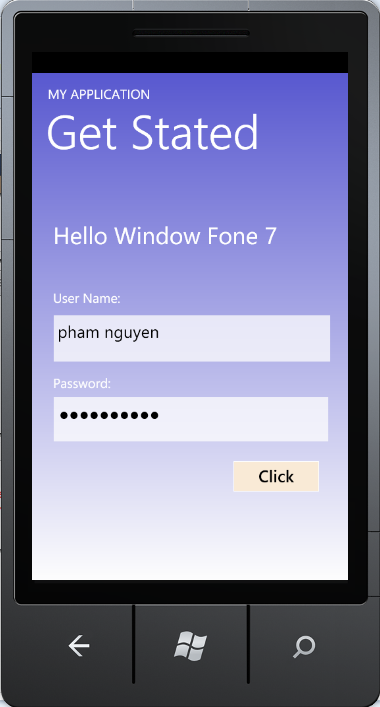
Technorati Tags: Window Fone 7
 Pham Nguyen