Intruduction :
Trong bài này mình xin chia sẽ về cách Customize AutoCompleteBox in Silverlight .
Creating Silverlight Project :
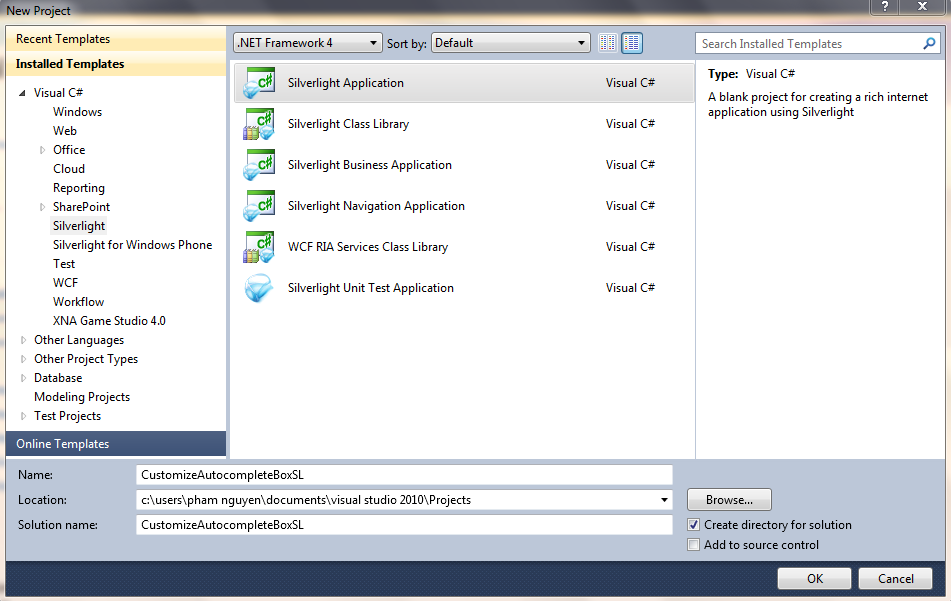
Tiếp theo chúng ta tạo một Basic Database :
using System;
using System.Collections.Generic;
using System.Linq;
using System.Text;
namespace CustomizeAutocompleteBoxSL
{
public class Codes
{
public List<Codes> Load()
{
List<Codes> codes = new List<Codes>
{
new Codes
{
Code = "PN", Name = "Phạm Nguyên"
},
new Codes
{
Code = "PD", Name = "Phi Diệp"
},
new Codes
{
Code = "CK", Name = "Chí Khang"
},
new Codes
{
Code = "MP", Name = "Minh Phúc"
},
new Codes
{
Code = "NS" , Name = "Ngọc Sơn"
},
new Codes
{
Code = "TK", Name = "Trọng Khoa"
},
new Codes
{
Code = "MS", Name = "Minh Sang"
},
new Codes
{
Code = "NH", Name = "Ngọc Hiển"
},
};
return codes;
}
public string Code { get; set; }
public string Name { get; set; }
}
}
Sau đó chúng ta Design Giao diện ứng dụng (dùng Expresstion Blend) :
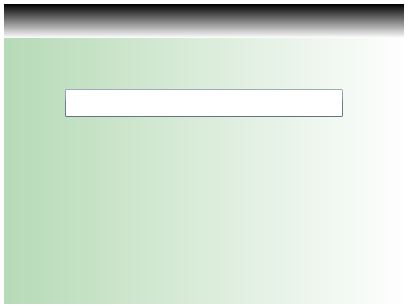
Tiếp theo chúng ta Customize AutoCompleteBox trong code XAML :
<UserControl x:Class="CustomizeAutocompleteBoxSL.MainPage"
xmlns="http://schemas.microsoft.com/winfx/2006/xaml/presentation"
xmlns:x="http://schemas.microsoft.com/winfx/2006/xaml"
xmlns:d="http://schemas.microsoft.com/expression/blend/2008"
xmlns:mc="http://schemas.openxmlformats.org/markup-compatibility/2006"
mc:Ignorable="d"
d:DesignHeight="300" d:DesignWidth="400" xmlns:sdk="http://schemas.microsoft.com/winfx/2006/xaml/presentation/sdk">
<Grid x:Name="LayoutRoot" HorizontalAlignment="Center" VerticalAlignment="Center" Width="400" Height="300">
<Grid.RowDefinitions>
<RowDefinition Height="34*" />
<RowDefinition Height="266*" />
</Grid.RowDefinitions>
<Grid.Background>
<LinearGradientBrush EndPoint="1,0.5" StartPoint="0,0.5">
<GradientStop Color="#FFB7DBB7" Offset="0" />
<GradientStop Color="White" Offset="1" />
</LinearGradientBrush>
</Grid.Background>
<sdk:AutoCompleteBox Height="28" ValueMemberPath="Name" HorizontalAlignment="Left" Margin="61,51,0,0" Name="autoCompleteBox" VerticalAlignment="Top" Width="278" Grid.Row="1" >
<sdk:AutoCompleteBox.ItemTemplate>
<DataTemplate>
<StackPanel Orientation="Horizontal">
<TextBlock Text="{Binding Code}" FontWeight="Bold" Foreground="Black" Width="30"/>
<TextBlock Text="{Binding Name}" Foreground="Black"/>
</StackPanel>
</DataTemplate>
</sdk:AutoCompleteBox.ItemTemplate>
</sdk:AutoCompleteBox>
<StackPanel Height="34" HorizontalAlignment="Left" Name="stackPanel1" VerticalAlignment="Top" Width="400">
<StackPanel.Background>
<LinearGradientBrush EndPoint="0.5,1" StartPoint="0.5,0">
<GradientStop Color="Black" Offset="0" />
<GradientStop Color="White" Offset="1" />
</LinearGradientBrush>
</StackPanel.Background>
</StackPanel>
</Grid>
</UserControl>
Tiếp theo là Load dữ liệu vào AutoCompletebox :
using System;
using System.Collections.Generic;
using System.Linq;
using System.Net;
using System.Windows;
using System.Windows.Controls;
using System.Windows.Documents;
using System.Windows.Input;
using System.Windows.Media;
using System.Windows.Media.Animation;
using System.Windows.Shapes;
namespace CustomizeAutocompleteBoxSL
{
public partial class MainPage : UserControl
{
Codes code;
public MainPage()
{
code = new Codes();
List<Codes> myList = new List<Codes>();
myList = code.Load();
InitializeComponent();
autoCompleteBox.ItemsSource = myList;
}
}
}
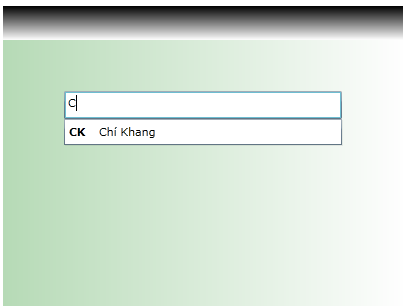
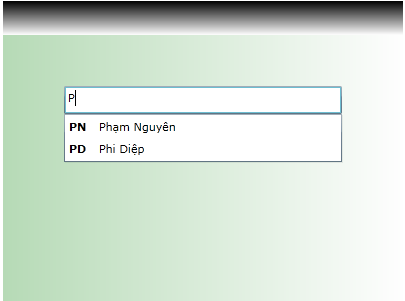
Run Application (Ctrl+ F5) và xem kết quả :
 Pham Nguyen
tui thấy ông ngày càng tuyệt vời quá đi nha
LikeLike
kakaka Tui mà lỵ ^^ Try Try Try !
LikeLike