Reminder Application In Windows Phone Mango
I.Introduction
– Reminder thuộc namespace Microsoft.Phone.Scheduler , Reminder giữ nhiệm vụ nhắc nhở chúng ta khi đến thời gian thực hiện một công việc nào đó.
– Trong bài này mình xin chia sẻ cách tạo 1 ứng nhắc nhở, sử dụng Reminder. mình gọi ứng dụng này là Reminder Application.
II.Creating Project And Coding
– Để bắt đầu bài này hãy chắc chắn là máy của bạn đã cài bộ Silverlight tookit for Windows Phone . các bạn có thể Download tại đây !
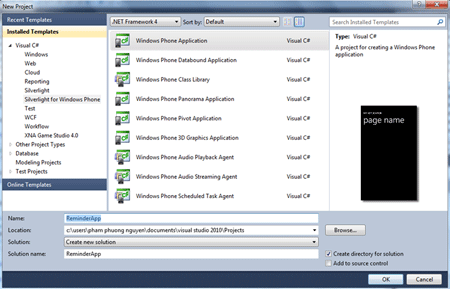
– Bây giờ chúng ta tạo mới một Windows Phone Application Project.
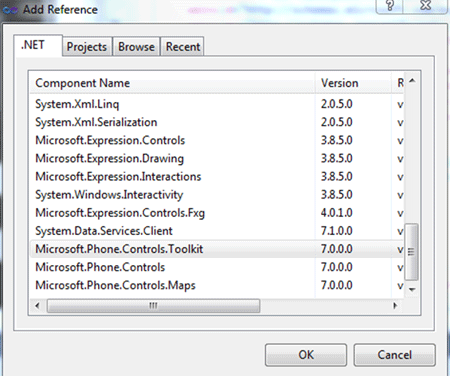
– Tiếp theo là Add thư viên Microsoft.Phone.Controls.Toolkit vào project :
- Right-Click vào References
- Chọn Add References
- Chọn Microsoft.Phone.Controls.Toolkit ở Tab .NET (hoặc chọn Tab Browse –> đến đường dẫn C:\Program Files\Microsoft SDKs\Windows Phone\v7.1\Toolkit hay C:\Program Files x86\Microsoft SDKs\Windows Phone\v7.1\Toolkit )
– Kế đến chúng ta khai báo thư viện để sử dụng Control trong code XAML (MainPage.xaml):
1: xmlns:toolkit="clr-namespace:Microsoft.Phone.Controls;assembly=Microsoft.Phone.Controls.Toolkit"
– Bây giờ chúng ta tạo một giao diện gồm có DatePicker, TimePicker, Textbox và một Button như sau :

Full XAML Code :
1: <phone:PhoneApplicationPage
2: x:Class="ReminderApp.MainPage"
3: xmlns="http://schemas.microsoft.com/winfx/2006/xaml/presentation"
4: xmlns:x="http://schemas.microsoft.com/winfx/2006/xaml"
5: xmlns:phone="clr-namespace:Microsoft.Phone.Controls;assembly=Microsoft.Phone"
6: xmlns:shell="clr-namespace:Microsoft.Phone.Shell;assembly=Microsoft.Phone"
7: xmlns:d="http://schemas.microsoft.com/expression/blend/2008"
8: xmlns:mc="http://schemas.openxmlformats.org/markup-compatibility/2006"
9: mc:Ignorable="d" d:DesignWidth="480" d:DesignHeight="768"
10: FontFamily="{StaticResource PhoneFontFamilyNormal}"
11: FontSize="{StaticResource PhoneFontSizeNormal}"
12: Foreground="{StaticResource PhoneForegroundBrush}"
13: xmlns:toolkit="clr-namespace:Microsoft.Phone.Controls;assembly=Microsoft.Phone.Controls.Toolkit"
14: SupportedOrientations="Portrait" Orientation="Portrait"
15: shell:SystemTray.IsVisible="True">
16:
17: <!--LayoutRoot is the root grid where all page content is placed-->
18: <Grid x:Name="LayoutRoot" Background="Transparent">
19: <Grid.RowDefinitions>
20: <RowDefinition Height="Auto"/>
21: <RowDefinition Height="*"/>
22: </Grid.RowDefinitions>
23:
24: <!--TitlePanel contains the name of the application and page title-->
25: <StackPanel x:Name="TitlePanel" Grid.Row="0" Margin="12,17,0,28">
26: <TextBlock x:Name="ApplicationTitle" Text="MY APPLICATION" Style="{StaticResource PhoneTextNormalStyle}"/>
27: <TextBlock x:Name="PageTitle" Text="Reminder App" Margin="9,-7,0,0" Style="{StaticResource PhoneTextTitle1Style}"/>
28: </StackPanel>
29:
30: <!--ContentPanel - place additional content here-->
31: <Grid x:Name="ContentPanel" Grid.Row="1" Margin="12,0,12,0">
32: <Grid.RowDefinitions>
33: <RowDefinition Height="Auto"/>
34: <RowDefinition Height="Auto"/>
35: <RowDefinition Height="Auto"/>
36: <RowDefinition Height="Auto"/>
37: <RowDefinition Height="Auto"/>
38: <RowDefinition Height="200"/>
39: <RowDefinition Height="Auto"/>
40: <RowDefinition Height="82*" />
41: </Grid.RowDefinitions>
42: <TextBlock Text="Date" Grid.Row="0" Margin="14,0,0,0"/>
43: <TextBlock Text="Time" Grid.Row="2" Margin="14,0,0,0"/>
44: <TextBlock Text="To Do" Grid.Row="4" Margin="14,0,0,0"/>
45: <TextBox Grid.Row="5" Name="txtContent" TextWrapping="Wrap"/>
46: <toolkit:DatePicker Grid.Row="1" Name="dpkDate" />
47: <toolkit:TimePicker Grid.Row="3" Name="tpkTime" />
48: <Button Content="Save" Grid.Row="7" Height="72" HorizontalAlignment="Left" Margin="293,4,0,0" Name="btnSave" VerticalAlignment="Top" Width="160" />
49: </Grid>
50: </Grid>
51:
52:
53: </phone:PhoneApplicationPage>
Tiếp theo là chúng ta xử lý sự kiện Click cho Button Save trong MainPage.xaml.cs:
1: using System;
2: using System.Collections.Generic;
3: using System.Linq;
4: using System.Net;
5: using System.Windows;
6: using System.Windows.Controls;
7: using System.Windows.Documents;
8: using System.Windows.Input;
9: using System.Windows.Media;
10: using System.Windows.Media.Animation;
11: using System.Windows.Shapes;
12: using Microsoft.Phone.Controls;
13: using Microsoft.Phone.Scheduler;
14:
15: namespace ReminderApp
16: {
17: public partial class MainPage : PhoneApplicationPage
18: {
19: // Constructor
20: public MainPage()
21: {
22: InitializeComponent();
23: this.btnSave.Click += btnSave_Click;
24: }
25:
26: void btnSave_Click(object sender, RoutedEventArgs e)
27: {
28: DateTime _Date = dpkDate.Value.Value;
29: TimeSpan _Time = tpkTime.Value.Value.TimeOfDay;
30: _Date = _Date.Date + _Time;
31: String _Content = txtContent.Text;
32: if (_Date < DateTime.Now)
33: MessageBox.Show("Your time is not match"
34: +"!\nPlease Enter again !");
35: else if (String.IsNullOrEmpty(_Content))
36: MessageBox.Show("Your task can't be empty "
37: + "!\n Please enter to do task !");
38: else
39: {
40: ScheduledAction _OldReminder =
41: ScheduledActionService.Find("TodoReminder");
42: if (_OldReminder != null)
43: ScheduledActionService.Remove(_OldReminder.Name);
44: Reminder _Reminder = new Reminder("TodoReminder")
45: {
46: BeginTime = _Date,
47: Title = "Reminder",
48: Content = _Content,
49: };
50: ScheduledActionService.Add(_Reminder);
51: MessageBox.Show("Set Reminder Completed");
52: }
53: }
54: }
55: }
Cuối cùng ứng dụng đã hoàn thành, chúng ta có thể Run trên Emulator hay Deloy trực tiếp trên Device để xem kết quả :
[sl-gallery:width=480, height=800, leftArrow=true, rightArrow=true, pageNumbers=false, thumbnails=false, preloader=false, fill=uniformtofill, bgmode=opaque]
/*It’s time for Windows Phone*/
 Pham Nguyen