Read and Save XML files using XmlSerializer
I.Introduction
– Lưu trữ dữ liệu ở đang XML là một trong những cách lưu trữ của Windows Phone, giúp chúng ta dể dàng truy suất và thực hiện các thao tác thêm sử xóa rất đơn giản.
– Trong bài này mình xin chia sẻ cách lưu trữ và đọc dữ liệu từ XML sử dụng XmlSerializer.
II.Fundamental
– Trước tiên chúng ta tạo một Windows Phone Application Project và chọn phải chuột vào References –> Add Reference 2 thư viện : System.Xml và System.Xml.Serialization

– Tiếp theo là khai báo namespace để sử dụng XmlSerializer và XmlWriter:
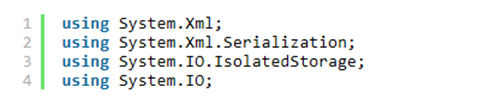
– Tiếp theo là chúng ta tạo một cơ sở dữ liệu đơn giản :

– Kế tiếp là chúng ta tạo một phương thức để tạo tạo dữ liệu :
1: private List<Person> GeneratePersonData()
2: {
3: List<Person> data = new List<Person>();
4: data.Add(new Person() { FirstName = "Kate", LastName = "Brown", Age = 25 });
5: data.Add(new Person() { FirstName = "Tom", LastName = "Stone", Age = 63 });
6: data.Add(new Person() { FirstName = "Michael", LastName = "Liberty", Age = 37 });
7: return data;
8: }
– Việc các thao tác trên file trong Windows Phone 7, chúng ta phải sử dụng lớp IsolateStorageFileStream để đọc ghi và tạo file trong IsolateStorage, để viết dữ liệu ra XML chúng ta cần có XmlWriter và hiển nhiên là để serialize và deserialize XML file thì chúng ta phải cần có XmlSerializer .
– Sau đây là cách viết dữ liệu ra file XML file và lưu ở IsolateStorage :
1: XmlWriterSettings xmlWriterSetting = new XmlWriterSettings();
2: XmlWriterSetting.Indent = true;
3: // Lấy thông tin IsolateStorage
4: using (IsolatedStorageFile isoStorage =
5: IsolatedStorageFile.GetUserForStoreApplication())
6: {
7: // Tạo một FileStream để tạo file hay mở file
8: using(IsolatedStorageFileStream Stream = new IsolatedStorageFileStream("Person.xml", System.IO.FileMode.OpenOrCreate, isoStorage))
9: {
10: XmlSerializer serializer = new XmlSerializer(typeof(List<Person>));
11: using (XmlWriter xmlWriter = XmlWriter.Create(FileStream,xmlWriterSetting))
12: {
13: // Viết dữ liệu theo Serialize
14: serializer.Serialize(xmlWriter,GeneratePersonData());
15: }
16: }
17: }
– Cuối cùng là cách đọc dữ liệu Đọc dữ liệu :
1: List<Person> ReadDataFromXML()
2: {
3: List<Person> Source = new List<Person>();
4: using (IsolatedStorageFile File = IsolatedStorageFile.GetUserStoreForApplication())
5: {
6: using (IsolatedStorageFileStream FileStream = new IsolatedStorageFileStream("Person.xml", System.IO.FileMode.Open, File))
7: {
8: // Trong FileStream thực hiện Deserialize
9: XmlSerializer serialize = new XmlSerializer(typeof(List<Person>));
10: // Ép kiểu về đúng kiểu ban đầu và Gán lại cho Source
11: Source = (List<Person>)serialize.Deserialize(FileStream);
12: };
13: };
14: return Source ;
15: }
– Về giao diện chúng ta dùng 1 ListBox để Show dữ liệu :
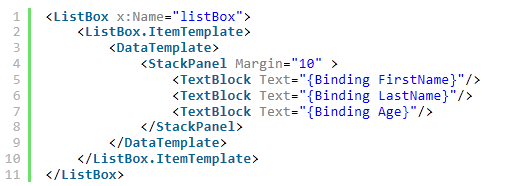
– Bây giờ là Run ứng dụng và xem kết quả :

Hy vọng bài viết sẽ mang đế thông tin hữu tích cho các bạn
Thanks for reading !
/*It’s time for Windows Phone*/
 Pham Nguyen
Bây giờ em mới áp dụng nè, tuyệt vời anh ạh ;))
LikeLike
bài này hay lắm. thanks nhìu :d
ah, chỗ này mình ko hiểu sao ko thể dùng serializer.Serialize(xmlWriter,mylistbox.ItemsSource); thay cho serializer.Serialize(xmlWriter,GeneratePersonData());.
mylistbox.ItemsSource đã có dữ liệu.
LikeLike