I.Introduction
– MVVM là từ viết tắt của Model-View-ViewModel Desgin parttern. Là mô hình sử dụng khá phổ biến hiện nay, từ những ứng dụng Windows Phone cho đến những ứng dụng web, Windows 8.
– MVVM giúp cho việc cập nhật, binding dữ liệu được xuyên suốt trong quá trình tương tác, chúng ta có thể hiểu đơn giản là với kiến trúc này chúng ta chỉ việc tương tác với dữ liệu thì phía giao diện sẽ tự động thay đổi theo.
– Với kiến trúc này sẽ tách biệt giữa kiến trúc dữ liệu, quá trình xử lý, và giao diện ứng dụng
– Trong bài này mình xin chia sẻ cách sử dụng kiến trúc MVVM trong Windows Phone.
II.Fundamental
1. Model :
Chứa kiến trúc dữ liệu của ứng dụng, trong Model chúng ta sẽ đinh nghĩa những lớp cấu tạo nên ứng dụng, những cấu trúc dữ liệu cần thiết.
2. ViewModel : Chứa dữ liệu để đổ ra ngoài giao diện, ví dụ như “một danh sách sinh viên” chẳng hạn. Ngoài ra các thao tác trên dữ liệu như thêm, sửa, xóa, cập nhật … cũng được xử lý trong ViewModel
3. View : Giao diện ứng dụng
III.Advanced
Chúng ta đã tìm hiểu sơ về những khái niệm cơ bản trong MVVM, bây giờ chúng ta hãy cùng nhau làm một ví dụ nhỏ để thấy được cái hay của MVVM.
Trước tiên chúng ta tạo mới Project Windows Phone, tiếp theo là tạo 2 Folder là Model và ViewModel để chứa các lớp của ứng dụng
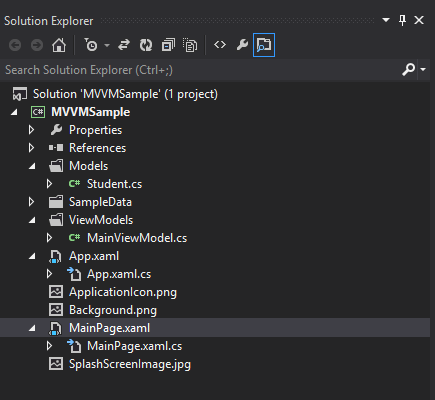
Sau khi đã chuẩn bị các Folder theo đúng kiến trúc, bây giờ chúng ta bắt đầu đinh nghĩa cấu trúc của lớp Student gồm Id và Name.
1: using System;
2: using System.Collections.Generic;
3: using System.Linq;
4: using System.Text;
5:
6: using System.ComponentModel;
7: namespace MVVMSample.Models
8: {
9: public class Student : INotifyPropertyChanged
10: {
11:
12: private string _name;
13:
14: public string Name
15: {
16: get { return _name; }
17: set
18: {
19: if (value != _name)
20: {
21: _name = value;
22: NotifyChanged("Name");
23: }
24: }
25: }
26:
27: private string _id;
28:
29: public string Id
30: {
31: get { return _id; }
32: set
33: {
34: _id = value;
35: NotifyChanged("Id");
36: }
37: }
38:
39:
40: public event PropertyChangedEventHandler PropertyChanged;
41:
42: public void NotifyChanged(string propertyName)
43: {
44: if (PropertyChanged != null)
45: {
46: PropertyChanged(this, new PropertyChangedEventArgs(propertyName));
47: }
48: }
49: }
50: }
Chú ý :
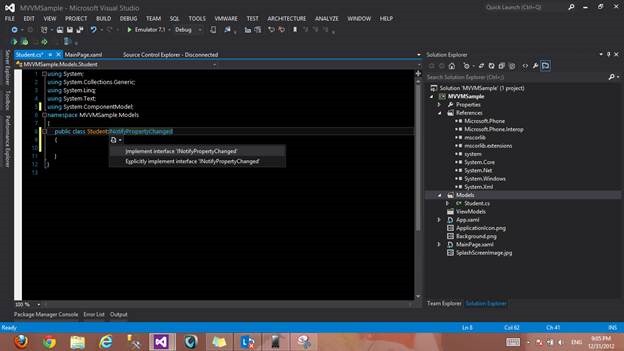
Trong Windows Phone để dữ liệu được cập nhật ngoài giao diện một cách xuyên suốt, chúng ta phải cho Model kế từ từ Interface INotifyPropertyChanged thuộc namespace System.ComponentModel và phải Implement Interface này .
Phương thức NotifyChanged là một phương thức không thể thiếu, vì phương thức này chịu trách nhiệu thông báo về sự thay đổi của dữ liệu ra phía giao diện. Và điều này giúp dữ liệu cập nhật một cách xuyên suốt.
Vậy là phía Model chúng ta đã xây dựng xong, bây giờ đến ViewModel. Trong ViewModel chúng ta sẽ định nghĩa một lớp MainViewModel. Lớp này chứa thông tin dữ liệu mà chúng ta Binding ra ngoài phía giao diện, ngoài ra mình định nghĩa thêm những phương thức để xử lý việc tương tác dữ liệu, cụ thể mình sẽ làm 1 phương thức AddStudent để thêm dữ liệu.
Ngoài ra mình chuẩn bị thêm phương thức LoadData để tạo dữ liệu mẫu.
1: using System;
2: using System.Collections.Generic;
3: using System.Linq;
4: using System.Text;
5:
6: using System.ComponentModel;
7: using System.Collections.ObjectModel;
8: using MVVMSample.Models;
9: namespace MVVMSample.ViewModels
10: {
11: public class MainViewModel : INotifyPropertyChanged
12: {
13:
14: public ObservableCollection<Student> ListStudents { get; set; }
15:
16: private bool _isDataLoaded;
17:
18: public bool IsDataLoaded
19: {
20: get { return _isDataLoaded; }
21: set
22: {
23: if (_isDataLoaded != value)
24: {
25: _isDataLoaded = value;
26: NotifyChanged("IsDataLoaded");
27: }
28: }
29: }
30:
31: public void AddStudent(Student student)
32: {
33: this.ListStudents.Add(student);
34: }
35:
36: public MainViewModel()
37: {
38: ListStudents = new ObservableCollection<Student>();
39:
40: LoadData();
41: }
42:
43: public void LoadData()
44: {
45: this.ListStudents.Add(new Student() { Id = Guid.NewGuid().ToString(), Name = "Phạm Phương Nguyên" });
46: this.ListStudents.Add(new Student() { Id = Guid.NewGuid().ToString(), Name = "Chung Vĩnh Khang" });
47: this.ListStudents.Add(new Student() { Id = Guid.NewGuid().ToString(), Name = "Nguyễn Duy Phượng" });
48: this.ListStudents.Add(new Student() { Id = Guid.NewGuid().ToString(), Name = "Nguyễn Thiên Ca" });
49: this.ListStudents.Add(new Student() { Id = Guid.NewGuid().ToString(), Name = "Trần Chí Khang" });
50: this.ListStudents.Add(new Student() { Id = Guid.NewGuid().ToString(), Name = "Lý Trong Khoa" });
51: this.ListStudents.Add(new Student() { Id = Guid.NewGuid().ToString(), Name = "Vũ Quang Huy" });
52: this.ListStudents.Add(new Student() { Id = Guid.NewGuid().ToString(), Name = "Nguyễn Thành Đạt" });
53: }
54:
55: public event PropertyChangedEventHandler PropertyChanged;
56:
57: public void NotifyChanged(string propertyName)
58: {
59: if (PropertyChanged != null)
60: {
61: PropertyChanged(this, new PropertyChangedEventArgs(propertyName));
62: }
63: }
64: }
65: }
Lưu ý : Cấu trúc dữ liệu để chứa tập dữ liệu là ObservableCollection trong namespace System.Collections.ObjectModel , cấu trúc dữ liệu này chịu trách nhiệm cập nhật dữ liệu ra phía dao diện khi chúng ta tương tác “thêm, xóa, sửa” một phần tử nào đó trong tập dữ liệu, Các bạn không nên dùng List hay IList trong các trường hợp thêm sửa xóa dữ liệu mà muốn nó tự cập nhật ngoài giao diện vì bản thân List, IList không hổ trợ vấn đề này mà bắt buộc phải dùng ObservableCollection
Bước xây dựng ViewModels và Models đã xong, bây giờ chỉ còn xử lý ở phía giao diện (view) ứng dụng, trước khi xây đựng giao diện ứng dụng, chúng ta vào App.xaml.cs khai báo 1 biến static MainViewModel để dùng trong suốt quá trình vận hành ứng dụng, đứng quên khởi tạo biến này trong contructor nhé.
public static MainViewModel ViewModel { get; set; }
Tiếp theo là chúng ta Xây dựng giao diện ứng dụng, gồm 1 textbox để nhập tên sinh viên, 1 button để thêm vào danh sách sinh viên, một Listbox để trình diễn dữ liệu. Và nhớ định nghĩa ItemTemplate cho ListBox nhé để việt Binding những filed đúng như ý mình, ngoài ra ở thuộc tính ItemSource chúng ta cần chỉ định đúng nguồn dữ liệu.
Xaml code :
1: <phone:PhoneApplicationPage
2: x:Class="MVVMSample.MainPage"
3: xmlns="http://schemas.microsoft.com/winfx/2006/xaml/presentation"
4: xmlns:x="http://schemas.microsoft.com/winfx/2006/xaml"
5: xmlns:phone="clr-namespace:Microsoft.Phone.Controls;assembly=Microsoft.Phone"
6: xmlns:shell="clr-namespace:Microsoft.Phone.Shell;assembly=Microsoft.Phone"
7: xmlns:d="http://schemas.microsoft.com/expression/blend/2008"
8: xmlns:mc="http://schemas.openxmlformats.org/markup-compatibility/2006"
9: mc:Ignorable="d" d:DesignWidth="480" d:DesignHeight="768"
10: FontFamily="{StaticResource PhoneFontFamilyNormal}"
11: FontSize="{StaticResource PhoneFontSizeNormal}"
12: Foreground="{StaticResource PhoneForegroundBrush}"
13: SupportedOrientations="Portrait" Orientation="Portrait"
14: shell:SystemTray.IsVisible="True">
15: <phone:PhoneApplicationPage.Resources>
16: <DataTemplate x:Key="studentItemStyle">
17: <Grid d:DataContext="{d:DesignData /SampleData/StudentSampleData.xaml, Instance={x:Null}}" Height="71" Width="480">
18: <TextBlock Text="{Binding Name}" Margin="10,10,0,0" HorizontalAlignment="Left" VerticalAlignment="Top" FontSize="32" Width="460"/>
19: </Grid>
20: </DataTemplate>
21: </phone:PhoneApplicationPage.Resources>
22:
23: <!--LayoutRoot is the root grid where all page content is placed-->
24: <Grid x:Name="LayoutRoot" Background="Transparent">
25: <Grid.RowDefinitions>
26: <RowDefinition Height="Auto"/>
27: <RowDefinition Height="*"/>
28: </Grid.RowDefinitions>
29:
30: <!--TitlePanel contains the name of the application and page title-->
31: <StackPanel x:Name="TitlePanel" Grid.Row="0" Margin="12,17,0,28">
32: <TextBlock x:Name="ApplicationTitle" Text="MVVM" Style="{StaticResource PhoneTextNormalStyle}"/>
33: <TextBlock x:Name="PageTitle" Text="MVVM Sample" Margin="9,-7,0,0" Style="{StaticResource PhoneTextTitle1Style}"/>
34: </StackPanel>
35:
36: <!--ContentPanel - place additional content here-->
37: <Grid x:Name="ContentPanel" Grid.Row="1" Margin="12,0,12,0">
38: <Grid.RowDefinitions>
39: <RowDefinition Height="auto" />
40: <RowDefinition Height="auto"/>
41: <RowDefinition Height="auto"/>
42: <RowDefinition Height="auto"/>
43: <RowDefinition Height="*"/>
44: </Grid.RowDefinitions>
45: <TextBlock Grid.Row="0" Text="Name" Margin="14,0,0,0" />
46: <TextBox x:Name="txtStudentName" Grid.Row="1"/>
47: <Button Grid.Row="2" x:Name="btnSave" Width="150" Content="Save" HorizontalAlignment="Right" />
48: <ListBox Grid.Row="3" x:Name="lstStudents" ItemsSource="{Binding ListStudents}" ItemTemplate="{StaticResource studentItemStyle}" Margin="0,0,0,10" Grid.RowSpan="2"/></Grid>
49: </Grid>
50:
51: </phone:PhoneApplicationPage>
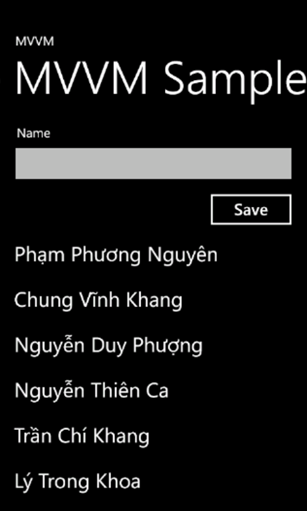
Bây giờ chúng ta thực hiện xử lý trong MainPage.xaml.cs để khi thêm tên sinh viên vào textbox và chọn save thì tên đó sẽ cập nhật ngay vào listbox mà chúng ta không cần làm thêm thao tác nào nữa.
1: using MVVMSample.Models;
2:
3: namespace MVVMSample
4: {
5: public partial class MainPage : PhoneApplicationPage
6: {
7: // Constructor
8: public MainPage()
9: {
10: InitializeComponent();
11: this.DataContext = App.ViewModel;
12: this.Loaded += MainPage_Loaded;
13: this.btnSave.Click += btnSave_Click;
14: }
15:
16: void btnSave_Click(object sender, RoutedEventArgs e)
17: {
18: App.ViewModel.AddStudent(new Student() { Id = Guid.NewGuid().ToString(), Name = txtStudentName.Text });
19: }
20:
21: void MainPage_Loaded(object sender, RoutedEventArgs e)
22: {
23: if (!App.ViewModel.IsDataLoaded)
24: App.ViewModel.LoadData();
25: }
26: }
27: }
Và bây giờ chạy ứng dụng và xem kết quả nào !
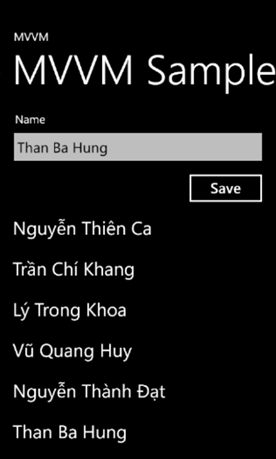
Khi gõ tên vào textbox và nhấn nút Save mà thấy là kết quả hiện liền phía dưới Listbox là các bạn đã thành công với MVVM rồi nhé !
Hy vọng bài viết sẽ mang thông tin hữ ích đến với các bạn !
 Pham Nguyen