I. Introduction
Trong những bài trước mình đã chia sẻ đôi điều về Local Database và MVVV design parttern.
Trong bài này mình xin chia sẻ cách làm ứng dụng có sử dụng Local Database và MVVM trong Windows Phone, cụ thể là ứng dụng Todo List một ứng dụng đơn giản nhưng rất khả dụng.
Trước bắt đầu bài viết này mình hy vọng các bạn đã nắm đc kiến thức về :
II. Fundamental
1. xây dựng giao diện
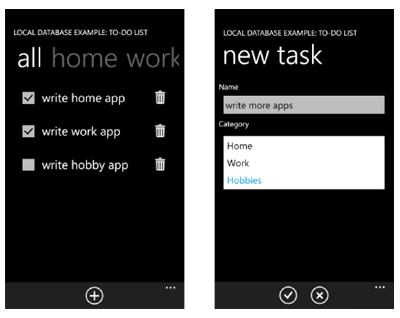
Ứng dụng Todo list sẽ có giao diện như sau :
Sau khi tạo Project mới chúng ta chuẩn bị các thư mục, cũng như các file cần thiết theo chuẩn mô hình MVVM như sau :
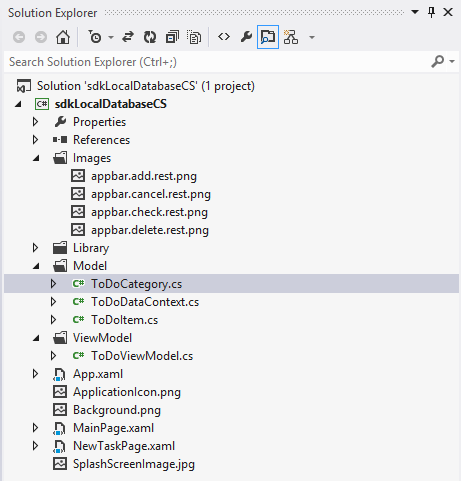
Bước chuẩn bị đã xong, bây giờ chúng ta đi vào xây dựng giao diện cho ứng dụng.
1.1 Xây dựng giao diện cho MainPage
Trang chính ứng dụng sẽ gồm một Pivot control, các bạn có thể kéo thả từ toolbox vào.
Mỗi PivotItem sẽ có 1 Listbox để show dữ liệu .
Trong mỗi Listbox sẽ được Binding bởi ToDoListBoxItemTemplate, tamplate này được định nghĩa cho mỗi item của Listbox sẽ thể hiện thông tin gồm checkbox, text, và nút xóa item.
Code XAML của MainPage.xaml sẽ như sau :
<phone:PhoneApplicationPage
x:Class="sdkLocalDatabaseCS.MainPage"
xmlns="http://schemas.microsoft.com/winfx/2006/xaml/presentation"
xmlns:x="http://schemas.microsoft.com/winfx/2006/xaml"
xmlns:phone="clr-namespace:Microsoft.Phone.Controls;assembly=Microsoft.Phone"
xmlns:shell="clr-namespace:Microsoft.Phone.Shell;assembly=Microsoft.Phone"
xmlns:d="http://schemas.microsoft.com/expression/blend/2008"
xmlns:mc="http://schemas.openxmlformats.org/markup-compatibility/2006"
mc:Ignorable="d" d:DesignWidth="480" d:DesignHeight="696"
FontFamily="{StaticResource PhoneFontFamilyNormal}"
FontSize="{StaticResource PhoneFontSizeNormal}"
Foreground="{StaticResource PhoneForegroundBrush}"
SupportedOrientations="Portrait" Orientation="Portrait"
shell:SystemTray.IsVisible="True"
xmlns:controls="clr-namespace:Microsoft.Phone.Controls;assembly=Microsoft.Phone.Controls">
<phone:PhoneApplicationPage.Resources>
<DataTemplate x:Key="ToDoListBoxItemTemplate">
<Grid HorizontalAlignment="Stretch" Width="420">
<Grid.ColumnDefinitions>
<ColumnDefinition Width="100" />
<ColumnDefinition Width="*" />
<ColumnDefinition Width="Auto" />
<ColumnDefinition Width="100" />
</Grid.ColumnDefinitions>
<CheckBox
IsChecked="{Binding IsComplete, Mode=TwoWay}"
Grid.Column="0" VerticalAlignment="Top"/>
<TextBlock
Text="{Binding ItemName}"
FontSize="{StaticResource PhoneFontSizeLarge}"
Grid.Column="1" Grid.ColumnSpan="2"
VerticalAlignment="Top" Margin="-36, 12, 0, 0"/>
<Button
Grid.Column="3"
x:Name="deleteTaskButton"
BorderThickness="0"
Margin="0, -18, 0, 0"
Click="deleteTaskButton_Click">
<Image
Source="/Images/appbar.delete.rest.png"
Height="75"
Width="75"/>
</Button>
</Grid>
</DataTemplate>
</phone:PhoneApplicationPage.Resources>
<!--LayoutRoot is the root grid where all page content is placed.-->
<Grid x:Name="LayoutRoot" Background="Transparent">
<Grid.RowDefinitions>
<RowDefinition Height="Auto"/>
<RowDefinition Height="*"/>
</Grid.RowDefinitions>
<!--TitlePanel contains the name of the application and page title.-->
<StackPanel x:Name="TitlePanel" Grid.Row="0" Margin="12,17,0,28">
<TextBlock
x:Name="ApplicationTitle"
Text="LOCAL DATABASE EXAMPLE: TO-DO LIST"
Style="{StaticResource PhoneTextNormalStyle}"/>
</StackPanel>
<!--ContentPanel - place additional content here.-->
<Grid x:Name="ContentPanel" Grid.Row="1" Margin="12,0,12,0">
<controls:Pivot Margin="0, -36, 0, 0">
<controls:PivotItem Header="all">
<ListBox
x:Name="allToDoItemsListBox"
ItemsSource="{Binding AllToDoItems}"
Margin="12, 0, 12, 0" Width="440"
ItemTemplate="{StaticResource ToDoListBoxItemTemplate}" />
</controls:PivotItem>
<controls:PivotItem Header="home">
<ListBox
x:Name="homeToDoItemsListBox"
ItemsSource="{Binding HomeToDoItems}"
Margin="12, 0, 12, 0" Width="440"
ItemTemplate="{StaticResource ToDoListBoxItemTemplate}" />
</controls:PivotItem>
<controls:PivotItem Header="work">
<ListBox
x:Name="workToDoItemsListBox"
ItemsSource="{Binding WorkToDoItems}"
Margin="12, 0, 12, 0" Width="440"
ItemTemplate="{StaticResource ToDoListBoxItemTemplate}" />
</controls:PivotItem>
<controls:PivotItem Header="hobbies">
<ListBox
x:Name="hobbiesToDoItemsListBox"
ItemsSource="{Binding HobbiesToDoItems}"
Margin="12, 0, 12, 0" Width="440"
ItemTemplate="{StaticResource ToDoListBoxItemTemplate}" />
</controls:PivotItem>
</controls:Pivot>
</Grid>
</Grid>
<phone:PhoneApplicationPage.ApplicationBar>
<shell:ApplicationBar IsVisible="True" IsMenuEnabled="True">
<shell:ApplicationBarIconButton
IconUri="/Images/appbar.add.rest.png"
Text="add"
x:Name="newTaskAppBarButton"
Click="newTaskAppBarButton_Click"/>
</shell:ApplicationBar>
</phone:PhoneApplicationPage.ApplicationBar>
</phone:PhoneApplicationPage>
Mình xin giải thích thêm một chút là những Button ở Appplication bar các bạn phải để ngoài thẻ Grid nhé, nếu không lẽ lỗi đấy tham khảo chi tiết tại đây http://phamnguyen.info/?p=2363
1.2 Xây dựng giao diện cho NewTask (trang tạo mới công việc)
Chúng ta thiết kế giao diện cho trang tạo mới công việc một các đơn giản gồm:
Một ListPicker để chứa thông tin của Category (chuyên mục) của công việc.
Một Textbox để nhập thông tin công việc.
Ngoài ra chúng ta cần thêm 2 ApplicatoinBar Button cho thao tác Thêm và cancel.
<phone:PhoneApplicationPage
x:Class="sdkLocalDatabaseCS.NewTaskPage"
xmlns="http://schemas.microsoft.com/winfx/2006/xaml/presentation"
xmlns:x="http://schemas.microsoft.com/winfx/2006/xaml"
xmlns:phone="clr-namespace:Microsoft.Phone.Controls;assembly=Microsoft.Phone"
xmlns:shell="clr-namespace:Microsoft.Phone.Shell;assembly=Microsoft.Phone"
xmlns:d="http://schemas.microsoft.com/expression/blend/2008"
xmlns:mc="http://schemas.openxmlformats.org/markup-compatibility/2006"
FontFamily="{StaticResource PhoneFontFamilyNormal}"
FontSize="{StaticResource PhoneFontSizeNormal}"
Foreground="{StaticResource PhoneForegroundBrush}"
SupportedOrientations="Portrait" Orientation="Portrait"
mc:Ignorable="d" d:DesignHeight="696" d:DesignWidth="480"
shell:SystemTray.IsVisible="True"
xmlns:toolkit="clr-namespace:Microsoft.Phone.Controls;assembly=Microsoft.Phone.Controls.Toolkit">
<!--LayoutRoot is the root grid where all page content is placed.-->
<Grid x:Name="LayoutRoot" Background="Transparent">
<Grid.RowDefinitions>
<RowDefinition Height="Auto"/>
<RowDefinition Height="*"/>
</Grid.RowDefinitions>
<!--TitlePanel contains the name of the application and page title.-->
<StackPanel x:Name="TitlePanel" Grid.Row="0" Margin="12,17,0,28">
<TextBlock
x:Name="ApplicationTitle"
Text="LOCAL DATABASE EXAMPLE: TO-DO LIST"
Style="{StaticResource PhoneTextNormalStyle}"/>
<TextBlock
x:Name="PageTitle"
Text="new task"
Margin="9,-7,0,0"
Style="{StaticResource PhoneTextTitle1Style}"/>
</StackPanel>
<!--ContentPanel - place additional content here.-->
<StackPanel x:Name="ContentPanel" Grid.Row="1" Margin="12,0,12,0">
<TextBlock Text="Name"/>
<TextBox x:Name="newTaskNameTextBox"/>
<TextBlock Text="Category"/>
<toolkit:ListPicker
x:Name="categoriesListPicker"
ItemsSource="{Binding CategoriesList}"
DisplayMemberPath="Name">
</toolkit:ListPicker>
</StackPanel>
</Grid>
<phone:PhoneApplicationPage.ApplicationBar>
<shell:ApplicationBar IsVisible="True" IsMenuEnabled="True">
<shell:ApplicationBarIconButton
x:Name="appBarOkButton"
IconUri="/Images/appbar.check.rest.png"
Text="ok"
Click="appBarOkButton_Click"/>
<shell:ApplicationBarIconButton
x:Name="appBarCancelButton"
IconUri="/Images/appbar.cancel.rest.png"
Text="cancel"
Click="appBarCancelButton_Click"/>
</shell:ApplicationBar>
</phone:PhoneApplicationPage.ApplicationBar>
</phone:PhoneApplicationPage>
Vậy là bước tạo giao diện đã xong, nhân tiện các bạn tạo trước các sự kiện click cho Buttom luôn nhé.
2. Xây dựng kiến trúc dữ liệu (Model)
Chúng ta sẽ xây dựng kiến trúc dữ liệu như sau :
DataContext sẽ chưa 2 đối tượng table là Category và ToDoItem.
Mỗi ToDoItem sẽ thuộc một Category.
2.1 Định nghĩa cấu trúc TodoItem
ToDoItem sẽ gồm các Properties như sau :
- ToDoItemId
- ItemName
- IsComplete
- CategoryId
Về mặt quan niệm thì chúng ta sẽ định nghĩa ToDoItem với các thuộc tính trên, nhưng trong code C# các bạn nhơ định nghĩa theo chuẩn Local Database nhé
ToDoItem.cs
using System;
using System.Collections.Generic;
using System.Linq;
using System.Text;
using System;
using System.ComponentModel;
using System.Data.Linq;
using System.Data.Linq.Mapping;
namespace sdkLocalDatabaseCS.Model
{
[Table]
public class ToDoItem : INotifyPropertyChanged, INotifyPropertyChanging
{
// Define ID: private field, public property, and database column.
private int _toDoItemId;
[Column(IsPrimaryKey = true, IsDbGenerated = true, DbType = "INT NOT NULL Identity", CanBeNull = false, AutoSync = AutoSync.OnInsert)]
public int ToDoItemId
{
get { return _toDoItemId; }
set
{
if (_toDoItemId != value)
{
NotifyPropertyChanging("ToDoItemId");
_toDoItemId = value;
NotifyPropertyChanged("ToDoItemId");
}
}
}
// Define item name: private field, public property, and database column.
private string _itemName;
[Column]
public string ItemName
{
get { return _itemName; }
set
{
if (_itemName != value)
{
NotifyPropertyChanging("ItemName");
_itemName = value;
NotifyPropertyChanged("ItemName");
}
}
}
// Define completion value: private field, public property, and database column.
private bool _isComplete;
[Column]
public bool IsComplete
{
get { return _isComplete; }
set
{
if (_isComplete != value)
{
NotifyPropertyChanging("IsComplete");
_isComplete = value;
NotifyPropertyChanged("IsComplete");
}
}
}
// Version column aids update performance.
[Column(IsVersion = true)]
private Binary _version;
// Internal column for the associated ToDoCategory ID value
[Column]
internal int _categoryId;
// Entity reference, to identify the ToDoCategory "storage" table
private EntityRef<ToDoCategory> _category;
// Association, to describe the relationship between this key and that "storage" table
[Association(Storage = "_category", ThisKey = "_categoryId", OtherKey = "Id", IsForeignKey = true)]
public ToDoCategory Category
{
get { return _category.Entity; }
set
{
NotifyPropertyChanging("Category");
_category.Entity = value;
if (value != null)
{
_categoryId = value.Id;
}
NotifyPropertyChanging("Category");
}
}
#region INotifyPropertyChanged Members
public event PropertyChangedEventHandler PropertyChanged;
// Used to notify that a property changed
private void NotifyPropertyChanged(string propertyName)
{
if (PropertyChanged != null)
{
PropertyChanged(this, new PropertyChangedEventArgs(propertyName));
}
}
#endregion
#region INotifyPropertyChanging Members
public event PropertyChangingEventHandler PropertyChanging;
// Used to notify that a property is about to change
private void NotifyPropertyChanging(string propertyName)
{
if (PropertyChanging != null)
{
PropertyChanging(this, new PropertyChangingEventArgs(propertyName));
}
}
#endregion
}
}
Mình xin giải thích thêm một chút trong lớp ToDoItem ở đoạn :
// Internal column for the associated ToDoCategory ID value
[Column]
internal int _categoryId;
// Entity reference, to identify the ToDoCategory "storage" table
private EntityRef<ToDoCategory> _category;
// Association, to describe the relationship between this key and that "storage" table
[Association(Storage = "_category", ThisKey = "_categoryId", OtherKey = "Id", IsForeignKey = true)]
public ToDoCategory Category
{
get { return _category.Entity; }
set
{
NotifyPropertyChanging("Category");
_category.Entity = value;
if (value != null)
{
_categoryId = value.Id;
}
NotifyPropertyChanging("Category");
}
}
Đoạn này dùng để thể hiện quan hệ của lớp ToDoItem và ToDocategory. Trong ToDoItem sẽ có một đối tượng ToDoCategory tham chiếu tới những Category trong Database.
Chúng ta sẽ hiểu rõ hơn nếu nhìn vào các thuộc tính ở nơi khai báo Association :
- Storage: chỉ định lưu trữ khóa ngoại
- ThisKey: Chỉ định khoái ngoại trong nội tại đối tượng
- OtherKey: Chỉ định sẽ tham chiếu tới Khóa chính của đối tượng cần tham chiếu. Cụ thể trong bài toán của mình là Id của đối tượng ToDoCategory
- Các thuộc tính khác các bạn xem lại bài Local Database nhé, mình có đề cập ở đó.
2.2 Định nghĩa cấu trúc của ToDoCategory
ToDoCategory sẽ đơn giản hơn rất nhiều chúng ta chỉ cần định nghĩa hai thuộc tính :
- Id
- Name
- Cũng tương tự như ToDoItem các bạn nhớ định nghĩa theo cấu trúc Local Database nhé :
using System;
using System.Collections.Generic;
using System.Linq;
using System.Text;
using System;
using System.ComponentModel;
using System.Data.Linq;
using System.Data.Linq.Mapping;
namespace sdkLocalDatabaseCS.Model
{
[Table]
public class ToDoCategory : INotifyPropertyChanged, INotifyPropertyChanging
{
// Define ID: private field, public property, and database column.
private int _id;
[Column(DbType = "INT NOT NULL IDENTITY", IsDbGenerated = true, IsPrimaryKey = true)]
public int Id
{
get { return _id; }
set
{
NotifyPropertyChanging("Id");
_id = value;
NotifyPropertyChanged("Id");
}
}
// Define category name: private field, public property, and database column.
private string _name;
[Column]
public string Name
{
get { return _name; }
set
{
NotifyPropertyChanging("Name");
_name = value;
NotifyPropertyChanged("Name");
}
}
// Version column aids update performance.
[Column(IsVersion = true)]
private Binary _version;
// Define the entity set for the collection side of the relationship.
private EntitySet<ToDoItem> _todos;
[Association(Storage = "_todos", OtherKey = "_categoryId", ThisKey = "Id")]
public EntitySet<ToDoItem> ToDos
{
get { return this._todos; }
set { this._todos.Assign(value); }
}
// Assign handlers for the add and remove operations, respectively.
public ToDoCategory()
{
_todos = new EntitySet<ToDoItem>(
new Action<ToDoItem>(this.attach_ToDo),
new Action<ToDoItem>(this.detach_ToDo)
);
}
// Called during an add operation
private void attach_ToDo(ToDoItem toDo)
{
NotifyPropertyChanging("ToDoItem");
toDo.Category = this;
}
// Called during a remove operation
private void detach_ToDo(ToDoItem toDo)
{
NotifyPropertyChanging("ToDoItem");
toDo.Category = null;
}
#region INotifyPropertyChanged Members
public event PropertyChangedEventHandler PropertyChanged;
// Used to notify that a property changed
private void NotifyPropertyChanged(string propertyName)
{
if (PropertyChanged != null)
{
PropertyChanged(this, new PropertyChangedEventArgs(propertyName));
}
}
#endregion
#region INotifyPropertyChanging Members
public event PropertyChangingEventHandler PropertyChanging;
// Used to notify that a property is about to change
private void NotifyPropertyChanging(string propertyName)
{
if (PropertyChanging != null)
{
PropertyChanging(this, new PropertyChangingEventArgs(propertyName));
}
}
#endregion
}
}
- Trong lớp ToDoCategory có một số chổ khác với ToDoItem như :
// Assign handlers for the add and remove operations, respectively.
public ToDoCategory()
{
_todos = new EntitySet<ToDoItem>(
new Action<ToDoItem>(this.attach_ToDo),
new Action<ToDoItem>(this.detach_ToDo)
);
}
// Called during an add operation
private void attach_ToDo(ToDoItem toDo)
{
NotifyPropertyChanging("ToDoItem");
toDo.Category = this;
}
// Called during a remove operation
private void detach_ToDo(ToDoItem toDo)
{
NotifyPropertyChanging("ToDoItem");
toDo.Category = null;
}
// Define the entity set for the collection side of the relationship.
private EntitySet<ToDoItem> _todos;
[Association(Storage = "_todos", OtherKey = "_categoryId", ThisKey = "Id")]
public EntitySet<ToDoItem> ToDos
{
get { return this._todos; }
set { this._todos.Assign(value); }
}
Các bạn để ý là trong ToDoCategory có một thuộc tính là Todos kiểu dữ liệu EntitySet<ToDoItem> . thuộc tính này giúp lưu trữ danh sách ToDoItem để chúng ta dể dàng truy suất thông qua đối tượng ToDoCategory, ngoài ra các phương thức khác ở code bên trên cũng để giải quyết vấn đề này, giúp cho mỗi lần chúng ta thêm một đối tượng TodoItem thì đối tượng đó sẽ tự được thêm vào danh sách ToDos tương ứng của Category. Đây là cơ chết khá hay của LINQ.
2.3 Định nghĩa DataContext
Vậy là các lớp chúng ta đã định nghĩa xong, bây giờ chỉ còn lớp DataContext:
public class ToDoDataContext : DataContext
{
// Pass the connection string to the base class.
public ToDoDataContext(string connectionString)
: base(connectionString)
{ }
// Specify a table for the to-do items.
public Table<ToDoItem> Items;
// Specify a table for the categories.
public Table<ToDoCategory> Categories;
}
Bước xây dựng kiến trúc ứng dụng đã xong. Bây giờ chỉ còn là Xử Lý tương tác.
3. Xây dựng ViewModel
Đến đây thì mọi công việc có lẽ đã đơn giản hơn. Chúng ta chỉ cần xây dựng TodoViewModel chứa danh sách các ToDoItem và một số phương thức cần thiết như load, thêm, sửa, xóa, lưu để tương tác ra phía giao diện.
Các bạn dùng LINQ To SQL để xử lý các thao tác nhé
using System.Collections.Generic;
using System.Collections.ObjectModel;
using System.ComponentModel;
using System.Linq;
// Directive for the data model.
using LocalDatabaseSample.Model;
using sdkLocalDatabaseCS.Model;
namespace LocalDatabaseSample.ViewModel
{
public class ToDoViewModel : INotifyPropertyChanged
{
// LINQ to SQL data context for the local database.
private ToDoDataContext toDoDB;
// Class constructor, create the data context object.
public ToDoViewModel(string toDoDBConnectionString)
{
toDoDB = new ToDoDataContext(toDoDBConnectionString);
}
// All to-do items.
private ObservableCollection<ToDoItem> _allToDoItems;
public ObservableCollection<ToDoItem> AllToDoItems
{
get { return _allToDoItems; }
set
{
_allToDoItems = value;
NotifyPropertyChanged("AllToDoItems");
}
}
// To-do items associated with the home category.
private ObservableCollection<ToDoItem> _homeToDoItems;
public ObservableCollection<ToDoItem> HomeToDoItems
{
get { return _homeToDoItems; }
set
{
_homeToDoItems = value;
NotifyPropertyChanged("HomeToDoItems");
}
}
// To-do items associated with the work category.
private ObservableCollection<ToDoItem> _workToDoItems;
public ObservableCollection<ToDoItem> WorkToDoItems
{
get { return _workToDoItems; }
set
{
_workToDoItems = value;
NotifyPropertyChanged("WorkToDoItems");
}
}
// To-do items associated with the hobbies category.
private ObservableCollection<ToDoItem> _hobbiesToDoItems;
public ObservableCollection<ToDoItem> HobbiesToDoItems
{
get { return _hobbiesToDoItems; }
set
{
_hobbiesToDoItems = value;
NotifyPropertyChanged("HobbiesToDoItems");
}
}
// A list of all categories, used by the add task page.
private List<ToDoCategory> _categoriesList;
public List<ToDoCategory> CategoriesList
{
get { return _categoriesList; }
set
{
_categoriesList = value;
NotifyPropertyChanged("CategoriesList");
}
}
// Write changes in the data context to the database.
public void SaveChangesToDB()
{
toDoDB.SubmitChanges();
}
// Query database and load the collections and list used by the pivot pages.
public void LoadCollectionsFromDatabase()
{
// Specify the query for all to-do items in the database.
var toDoItemsInDB = from ToDoItem todo in toDoDB.Items
select todo;
// Query the database and load all to-do items.
AllToDoItems = new ObservableCollection<ToDoItem>(toDoItemsInDB);
// Specify the query for all categories in the database.
var toDoCategoriesInDB = from ToDoCategory category in toDoDB.Categories
select category;
// Query the database and load all associated items to their respective collections.
foreach (ToDoCategory category in toDoCategoriesInDB)
{
switch (category.Name)
{
case "Home":
HomeToDoItems = new ObservableCollection<ToDoItem>(category.ToDos);
break;
case "Work":
WorkToDoItems = new ObservableCollection<ToDoItem>(category.ToDos);
break;
case "Hobbies":
HobbiesToDoItems = new ObservableCollection<ToDoItem>(category.ToDos);
break;
default:
break;
}
}
// Load a list of all categories.
CategoriesList = toDoDB.Categories.ToList();
}
// Add a to-do item to the database and collections.
public void AddToDoItem(ToDoItem newToDoItem)
{
// Add a to-do item to the data context.
toDoDB.Items.InsertOnSubmit(newToDoItem);
// Save changes to the database.
toDoDB.SubmitChanges();
// Add a to-do item to the "all" observable collection.
AllToDoItems.Add(newToDoItem);
// Add a to-do item to the appropriate filtered collection.
switch (newToDoItem.Category.Name)
{
case "Home":
HomeToDoItems.Add(newToDoItem);
break;
case "Work":
WorkToDoItems.Add(newToDoItem);
break;
case "Hobbies":
HobbiesToDoItems.Add(newToDoItem);
break;
default:
break;
}
}
// Remove a to-do task item from the database and collections.
public void DeleteToDoItem(ToDoItem toDoForDelete)
{
// Remove the to-do item from the "all" observable collection.
AllToDoItems.Remove(toDoForDelete);
// Remove the to-do item from the data context.
toDoDB.Items.DeleteOnSubmit(toDoForDelete);
// Remove the to-do item from the appropriate category.
switch (toDoForDelete.Category.Name)
{
case "Home":
HomeToDoItems.Remove(toDoForDelete);
break;
case "Work":
WorkToDoItems.Remove(toDoForDelete);
break;
case "Hobbies":
HobbiesToDoItems.Remove(toDoForDelete);
break;
default:
break;
}
// Save changes to the database.
toDoDB.SubmitChanges();
}
#region INotifyPropertyChanged Members
public event PropertyChangedEventHandler PropertyChanged;
// Used to notify Silverlight that a property has changed.
private void NotifyPropertyChanged(string propertyName)
{
if (PropertyChanged != null)
{
PropertyChanged(this, new PropertyChangedEventArgs(propertyName));
}
}
#endregion
}
}
4. Xử lý sự kiện
Trước khi xử lý sự kiện ngoài giao diện ứng dụng chắc chắn rằng chúng ta phải tao Database phải không nào ?
Các bạn vào App.xaml.cs và kế tiếp là gọi hàm CreateDatabase trong Contructor của lớp App nhé .
// Specify the local database connection string.
string DBConnectionString = "Data Source=isostore:/ToDo.sdf";
// Create the database if it does not exist.
using (ToDoDataContext db = new ToDoDataContext(DBConnectionString))
{
if (db.DatabaseExists() == false)
{
// Create the local database.
db.CreateDatabase();
// Prepopulate the categories.
db.Categories.InsertOnSubmit(new ToDoCategory { Name = "Home" });
db.Categories.InsertOnSubmit(new ToDoCategory { Name = "Work" });
db.Categories.InsertOnSubmit(new ToDoCategory { Name = "Hobbies" });
// Save categories to the database.
db.SubmitChanges();
}
}
Ngoài ra chúng ta cùng cần tạo một biến static kiểu dữ liệu là ToDoViewModel để thao tác toàn ứng dụng
// The static ViewModel, to be used across the application.
private static ToDoViewModel viewModel;
public static ToDoViewModel ViewModel
{
get { return viewModel; }
}
Các bạn đừng quên gọi hàm để Load Database trong hàm khởi tạo của lớp App nhé.
Bây giờ chúng ta chỉ còn xử lý việc đổ dữ liệu ra ngoài giao diện, và xử lý các sự kiện thêm, xóa hay Navigate qua trang tạo mới.
MainPage.xaml.cs
using System;
using System.Collections.Generic;
using System.Linq;
using System.Net;
using System.Windows;
using System.Windows.Controls;
using System.Windows.Documents;
using System.Windows.Input;
using System.Windows.Media;
using System.Windows.Media.Animation;
using System.Windows.Shapes;
using Microsoft.Phone.Controls;
// Directive for the ViewModel.
using LocalDatabaseSample.Model;
using sdkLocalDatabaseCS.Model;
namespace sdkLocalDatabaseCS
{
public partial class MainPage : PhoneApplicationPage
{
// Constructor
public MainPage()
{
InitializeComponent();
// Set the page DataContext property to the ViewModel.
this.DataContext = App.ViewModel;
}
private void newTaskAppBarButton_Click(object sender, EventArgs e)
{
NavigationService.Navigate(new Uri("/NewTaskPage.xaml", UriKind.Relative));
}
private void deleteTaskButton_Click(object sender, RoutedEventArgs e)
{
// Cast the parameter as a button.
var button = sender as Button;
if (button != null)
{
// Get a handle for the to-do item bound to the button.
ToDoItem toDoForDelete = button.DataContext as ToDoItem;
App.ViewModel.DeleteToDoItem(toDoForDelete);
}
// Put the focus back to the main page.
this.Focus();
}
protected override void OnNavigatedFrom(System.Windows.Navigation.NavigationEventArgs e)
{
// Save changes to the database.
App.ViewModel.SaveChangesToDB();
}
}
}
NewTaskPage.xaml.cs
using System;
using System.Collections.Generic;
using System.Linq;
using System.Net;
using System.Windows;
using System.Windows.Controls;
using System.Windows.Documents;
using System.Windows.Input;
using System.Windows.Media;
using System.Windows.Media.Animation;
using System.Windows.Shapes;
using Microsoft.Phone.Controls;
// Directive for the ViewModel.
using LocalDatabaseSample.Model;
using sdkLocalDatabaseCS.Model;
namespace sdkLocalDatabaseCS
{
public partial class MainPage : PhoneApplicationPage
{
// Constructor
public MainPage()
{
InitializeComponent();
// Set the page DataContext property to the ViewModel.
this.DataContext = App.ViewModel;
}
private void newTaskAppBarButton_Click(object sender, EventArgs e)
{
NavigationService.Navigate(new Uri("/NewTaskPage.xaml", UriKind.Relative));
}
private void deleteTaskButton_Click(object sender, RoutedEventArgs e)
{
// Cast the parameter as a button.
var button = sender as Button;
if (button != null)
{
// Get a handle for the to-do item bound to the button.
ToDoItem toDoForDelete = button.DataContext as ToDoItem;
App.ViewModel.DeleteToDoItem(toDoForDelete);
}
// Put the focus back to the main page.
this.Focus();
}
protected override void OnNavigatedFrom(System.Windows.Navigation.NavigationEventArgs e)
{
// Save changes to the database.
App.ViewModel.SaveChangesToDB();
}
}
}
Lưu ý: Trong LINQ To SQL các dữ liệu các bạn đưa ra giao diện ứng dụng sẽ được load vào bộ nhớ. do đó bất kỳ thao tác nào như thêm, xóa, sửa từ giao diện, các bạn chỉ cần gọi hàm SaveChanges() vậy là dữ liệu đã tự cập nhật phía Database.
Trong một bài chia sẻ ngắn gọn có thể chưa giúp các bạn hiểu rõ, nếu bạn nào có thắc mắc, khó hiều cần giải đáp thì liên lạc mình nhé.
Hy vọng bài viết này sẽ hữu ích với các bạn !
 Pham Nguyen