I.Introduction
Trong Windows Phone 8 người dùng có thể chọn ứng dụng mà mình thích để hiển thị lock screen background mà ứng dụng đó cung cấp.
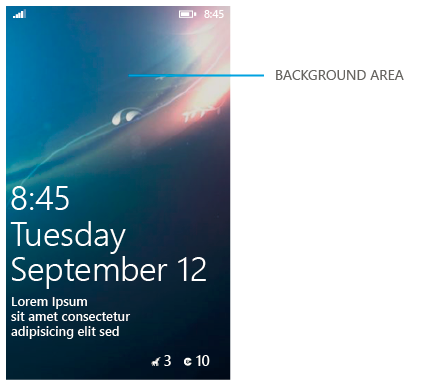
Trong bài này mình xin chia sẻ cách đơn giản giúp thay đổi lockscreen backround từ ứng dụng Windows Phone.
II. Fundamental
Để sử dụng tính năng này chúng ta chỉ cẩn thay đổi một chút thông tin trong file WMAppManifest.xml
Chúng ta click chuột phải vào file WMAppManifest.xml và chọn ViewCode, sau đó thêm đoạn code Extensions vào sau thẻ Tokens:
<Extensions>
<Extension ExtensionName="LockScreen_Background" ConsumerID="{111DFF24-AA15-4A96-8006-2BFF8122084F}" TaskID="_default" />
</Extensions>
các bạn lưu ý là đoạn code Extensions phải đúng từng câu, từ chữ như trên nhé !
Tiếp theo là chúng ta sẽ làm một phương thức ChangeLockscreen để thực hiện thay đổi Lockscreen khi ngưởi dùng chọn ứng dụng.
private async void ChangeLockscreen(string filePathOfTheImage, bool isAppResource)
{
try
{
var isProvider = Windows.Phone.System.UserProfile.LockScreenManager.IsProvidedByCurrentApplication;
if (!isProvider)
{
// If you're not the provider, this call will prompt the user for permission.
// Calling RequestAccessAsync from a background agent is not allowed.
var op = await Windows.Phone.System.UserProfile.LockScreenManager.RequestAccessAsync();
// Only do further work if the access was granted.
isProvider = op == Windows.Phone.System.UserProfile.LockScreenRequestResult.Granted;
}
if (isProvider)
{
// At this stage, the app is the active lock screen background provider.
// The following code example shows the new URI schema.
// ms-appdata points to the root of the local app data folder.
// ms-appx points to the Local app install folder, to reference resources bundled in the XAP package.
var schema = isAppResource ? "ms-appx:///" : "ms-appdata:///Local/";
var uri = new Uri(schema + filePathOfTheImage, UriKind.Absolute);
// Set the lock screen background image.
Windows.Phone.System.UserProfile.LockScreen.SetImageUri(uri);
// Get the URI of the lock screen background image.
var currentImage = Windows.Phone.System.UserProfile.LockScreen.GetImageUri();
System.Diagnostics.Debug.WriteLine("The new lock screen background image is set to {0}", currentImage.ToString());
}
else
{
MessageBox.Show("You said no, so I can't update your background.");
}
}
catch (System.Exception ex)
{
System.Diagnostics.Debug.WriteLine(ex.ToString());
}
}
Kế tiếp các bạn thêm hình nền vào solution, gọi hàm ChangeLockscreen và truyền vào đường dẩn đến hình tương ứng :
ChangeLockscreen("Assets/phamnguyenavata.jpg", true);
Bây giờ chúng ta built và chạy ứng dụng để thực thi hàm ChangeLockscreen, sau đó quay trở lại màn hình Start của Emulator –> chọn Settings –>Lock screen –> chọn background sẽ thấy tên ứng dụng của chúng ta
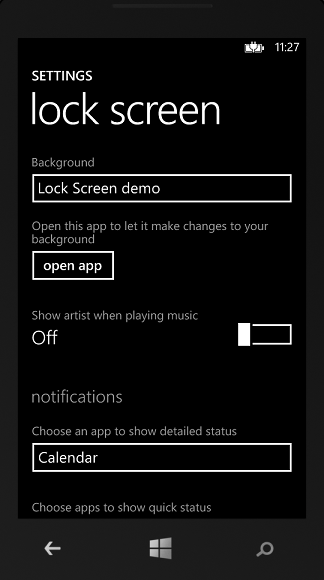
sau khi chọn đúng tên ứng dụng của chúng ta nếu ứng dụng chưa đc chạy lần nào thì các bạn chọn tiếp open app nhé. Nếu đã chạy rồi thì thoi.
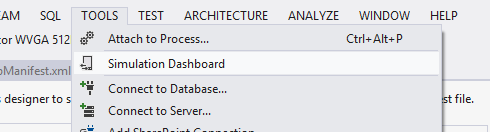
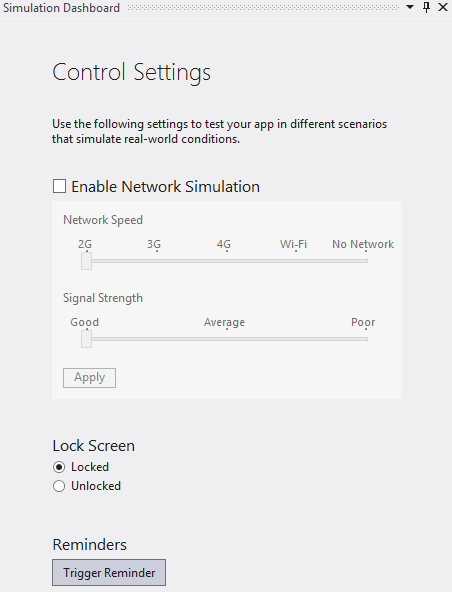
Bây giờ các bạn chọn vào menu Tool-> Simulation Dashboard –> Locked để xem kết quả

Hy vọng bài viết này sẽ hữu ích với các bạn
 Pham Nguyen