Xin chào các bạn, hôm nay mình xin Demo về tính năng Drag And Drop file trong Silverlight 4.0 mà cụ thể là lứng dụng của mình sẽ có khả năng Xem Image và Video khi file đc Drop từ Window vào Ứng Dụng….
Đầu tiên các bạn mở Visual Studio 2010 lên và tạo một Silverlight Application Project :

Tiếp theo mình Design giao diện cho Ứng Dụng :
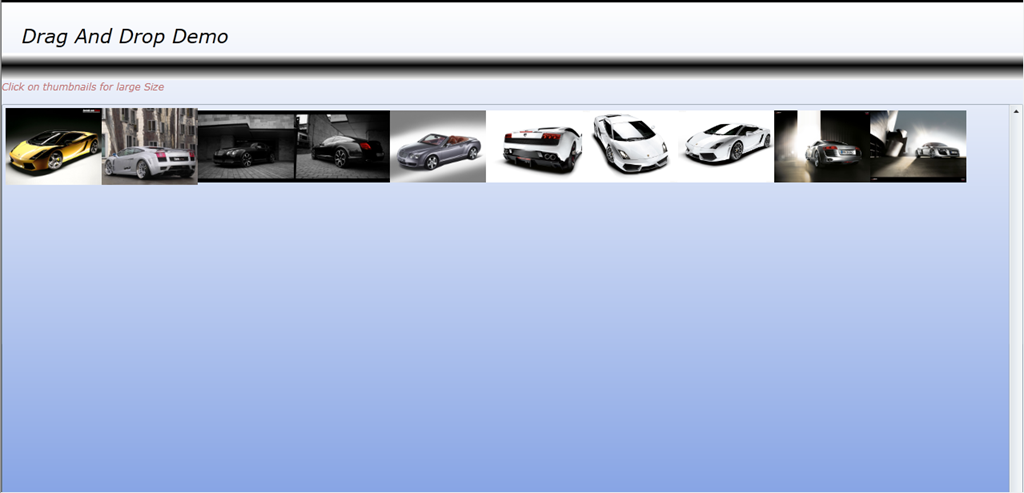
Ở phần giao diện mình thêm một Canvas để xử lý sự kiện nhận File khi Drop từ Window vào .
có 1 ScrollView để chưa hình ảnh hiển thị, trong ScrollView có một WrapPanel để hiển thị hình anh theo thứ tự
sau đây là Code XAML giao diện:
1: <UserControl x:Class="SilverlightDragAndDrop.MainPage"
2: xmlns="http://schemas.microsoft.com/winfx/2006/xaml/presentation"
3: xmlns:x="http://schemas.microsoft.com/winfx/2006/xaml"
4: xmlns:d="http://schemas.microsoft.com/expression/blend/2008"
5: xmlns:mc="http://schemas.openxmlformats.org/markup-compatibility/2006"
6: xmlns:Toolkit="http://schemas.microsoft.com/winfx/2006/xaml/presentation/toolkit"
7: mc:Ignorable="d"
8: d:DesignHeight="300" d:DesignWidth="400">
9:
10: <Grid x:Name="LayoutRoot" Background="White">
11: <Grid.RowDefinitions>
12: <RowDefinition Height="66"></RowDefinition>
13: <RowDefinition Height="31"/>
14: <RowDefinition Height="3"/>
15: <RowDefinition Height="30"></RowDefinition>
16: <RowDefinition Height="*"></RowDefinition>
17: </Grid.RowDefinitions>
18:
19: <Border Grid.Row="0" BorderThickness="3" BorderBrush="Black" Grid.RowSpan="3">
20: <!-- Canvas Nhận File khi Drag And Drop từ Window vào Ứng dụng-->
21: <Canvas Name="DropZongCanvas" AllowDrop="True" Height="800"
22: Drop="DropZongCanvas_Drop"
23: DragOver="DropZongCanvas_DragOver"
24: DragLeave="DropZongCanvas_DragLeave" Margin="-3,0,-3,-307">
25: <Canvas.Background>
26: <LinearGradientBrush EndPoint="0.5,1" StartPoint="0.5,0">
27: <GradientStop Color="White" Offset="0"/>
28: <GradientStop Color="#FF638ADE" Offset="1"/>
29: </LinearGradientBrush>
30: </Canvas.Background>
31: <TextBlock FontSize="24" FontStyle="Italic" Canvas.Left="25" Canvas.Top="25" Text="Drag And Drop Demo"/>
32: </Canvas>
33: </Border>
34: <TextBlock Grid.Row="3" FontSize="12" FontStyle="Italic" Foreground="#FFC07474" >Click on thumbnails for large Size</TextBlock>
35: <!--ScrollView giúp hiển thị hình ảnh-->
36: <ScrollViewer Grid.Row="4" Height="800" Margin="0,0,0,-280">
37: <Toolkit:WrapPanel Name="ImagineBox" Orientation="Horizontal" ScrollViewer.HorizontalScrollBarVisibility="Auto"></Toolkit:WrapPanel>
38: </ScrollViewer>
39: <Canvas Grid.Row="1" Grid.RowSpan="2">
40: <Canvas.Background>
41: <LinearGradientBrush EndPoint="0.5,1" StartPoint="0.5,0">
42: <GradientStop Color="Black" Offset="0.461"/>
43: <GradientStop Color="White" Offset="1"/>
44: <GradientStop Color="White" Offset="0.082"/>
45: </LinearGradientBrush>
46: </Canvas.Background>
47: <!-- Những nút này dành cho Video, để Play, Pause....-->
48: <Button Margin="10" Canvas.Left="15" Canvas.Top="-5" Visibility="Collapsed" Content="Play" Height="23" Name="btnPlay" Width="75" />
49: <Button Canvas.Left="106" Canvas.Top="6" Content="Pause" Visibility="Collapsed" Height="23" Name="btnPause" Width="75" />
50: <Button Canvas.Left="187" Canvas.Top="5" Content="Stop" Height="23" Name="btnStop" Visibility="Collapsed" Width="75" />
51: <Button Canvas.Left="268" Canvas.Top="5" Content="Zoom in" Height="23" Name="btnZoom" Visibility="Collapsed" Width="75" />
52: <Button Content="Zoom out" Height="23" Name="btnExit" Visibility="Collapsed" Width="75" Canvas.Left="349" Canvas.Top="5" />
53: </Canvas>
54: </Grid>
55: </UserControl>
Các bạn lưu ý ở đoạn Code :
<Toolkit:WrapPanel Name=”ImagineBox” Orientation=”Horizontal” ScrollViewer.HorizontalScrollBarVisibility=”Auto”></Toolkit:WrapPanel>
1: <Toolkit:WrapPanel Name="ImagineBox" Orientation="Horizontal"
2: ScrollViewer.HorizontalScrollBarVisibility="Auto">
3: </Toolkit:WrapPanel>
trước khi sử dụng đoạn Code trên thì các bạn phải khai báo :
xmlns:Toolkit="http://schemas.microsoft.com/winfx/2006/xaml/presentation/toolkit"
Việc khai báo như trên giúp các bạn Import thư viện Presentation/toolkit vào XAML.
ở phần giao diện đã xong….
Bây giờ chúng ta tiếp tục xử lý sự kiện.
Trước tiên chúng ta phân tích ứng dụng :
- Ứng dụng chúng ta muốn là nó có khả năng tương tác với Window và có thể Xem Image và Video
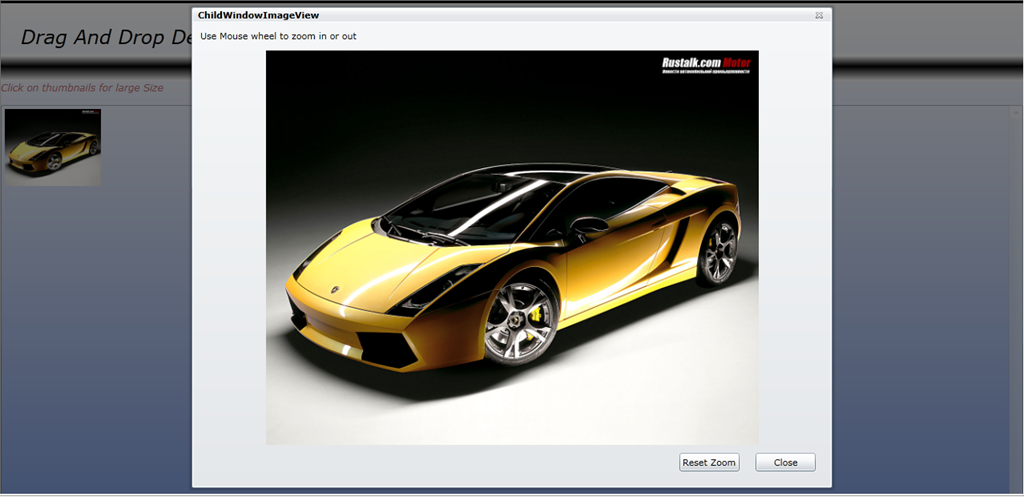
- Khi đã Load Image ra ScollView nếu chúng ta Click vào thì sẽ có một ChildWindow hiện ra và show Phóng to tấm hình vừa chọn
- Về Video Sau khi load thành công, khi chúng ta Click và thì sẽ có những Button hiện ra, và cho chúng ta làm những Thao tác như Play, Pause…
Bây giờ chúng ta tiếp tục xử lý sự kiện để ScrollView có thể Show hình ra ngoài
1: using System;
2: using System.Collections.Generic;
3: using System.Linq;
4: using System.Net;
5: using System.Windows;
6: using System.Windows.Controls;
7: using System.Windows.Documents;
8: using System.Windows.Input;
9: using System.Windows.Media;
10: using System.Windows.Media.Animation;
11: using System.Windows.Shapes;
12: using System.IO;
13: using System.Windows.Media.Imaging;
14: using System.Windows.Controls.Primitives;
15:
16: namespace SilverlightDragAndDrop
17: {
18: public partial class MainPage : UserControl
19: {
20: List<Image> images = new List<Image>();
21: private Popup tipPopup;
22: private MediaElement media;
23: DoubleAnimation Animation;
24: public MainPage()
25: {
26: InitializeComponent();
27: }
28: // Xử lý sự kiện Drop file từ phía Window vào
29: private void DropZongCanvas_Drop(object sender, DragEventArgs e)
30: {
31: if (e.Data == null) return;
32: IDataObject Data = e.Data;
33: FileInfo[] files = (FileInfo[])Data.GetData(DataFormats.FileDrop);
34: foreach (FileInfo item in files)
35: {
36: if (item.Extension.Trim() == ".png" || item.Extension.Trim() == ".PNG" || item.Extension.Trim() == ".JPG" || item.Extension.Trim() == ".jpg" || item.Extension.Trim() == ".bmp")
37: {
38: FileStream fs = item.OpenRead();
39: BitmapImage bitmap = new BitmapImage();
40: bitmap.SetSource(fs);
41:
42: Image img = new Image();
43: img.Source = bitmap;
44: img.Width = 120;
45: img.Width = 120;
46: img.Margin = new Thickness();
47: img.Stretch = Stretch.Uniform;
48: img.MouseLeftButtonDown += new MouseButtonEventHandler(img_MouseLeftButtonDown);
49: ImagineBox.Children.Add(img);
50: }
51: else if (item.Extension.Trim() == ".WMV" || item.Extension.Trim() == ".wmv")
52: {
53: FileStream fs = item.OpenRead();
54: MediaElement midi = new MediaElement();
55: midi.SetSource(fs);
56: media = midi;
57:
58: midi.Width = 120;
59: midi.Height = 120;
60: midi.Margin = new Thickness();
61: midi.Stretch = Stretch.Uniform;
62: midi.Play();
63:
64: midi.MouseLeftButtonDown += new MouseButtonEventHandler(midi_MouseLeftButtonDown);
65: ImagineBox.Children.Add(midi);
66: }
67: else
68: {
69: MessageBox.Show(item.Name + "is not support Image file");
70: }
71: }
72: }
73:
74: void midi_MouseLeftButtonDown(object sender, MouseButtonEventArgs e)
75: {
76: btnPlay.Visibility = Visibility.Visible;
77: btnPause.Visibility = Visibility.Visible;
78: btnStop.Visibility = Visibility.Visible;
79: btnExit.Visibility = Visibility.Visible;
80: btnZoom.Visibility = Visibility.Visible;
81: btnPlay.Click += new RoutedEventHandler(btnPlay_Click);
82: btnPause.Click += new RoutedEventHandler(btnPause_Click);
83: btnExit.Click += new RoutedEventHandler(btnExit_Click);
84: btnZoom.Click += new RoutedEventHandler(btnZoom_Click);
85:
86: }
87:
88: void img_MouseLeftButtonDown(object sender, MouseButtonEventArgs e)
89: {
90:
91: }
92: private void DropZongCanvas_DragOver(object sender, DragEventArgs e)
93: {
94: if (tipPopup == null)
95: {
96: String message = "Dar and Drop PNG AND JPG types Images";
97: Border border = new Border();
98: border.BorderBrush = new SolidColorBrush(Colors.Green);
99: border.BorderThickness = new Thickness(2.0);
100: border.Background = new SolidColorBrush(Colors.White);
101: TextBlock lbl = new TextBlock();
102: lbl.Margin = new Thickness(2);
103: border.Child = lbl;
104: tipPopup.Child = border;
105:
106:
107: }
108: tipPopup.VerticalOffset = e.GetPosition(null).Y;
109: tipPopup.HorizontalOffset = e.GetPosition(null).X;
110: tipPopup.IsOpen = true;
111: }
112:
113: private void DropZongCanvas_DragLeave(object sender, DragEventArgs e)
114: {
115: if (tipPopup.IsOpen == true)
116: tipPopup.IsOpen = false;
117: }
118: }
119: }
Đến đây thì hình của các bạn đã đc show ra ở ScrollView
Tiếp theo Chúng ta Add một ChildWindow để chứa Imagine . Childwindow này sẽ Show khi chúng ta click vào Images :
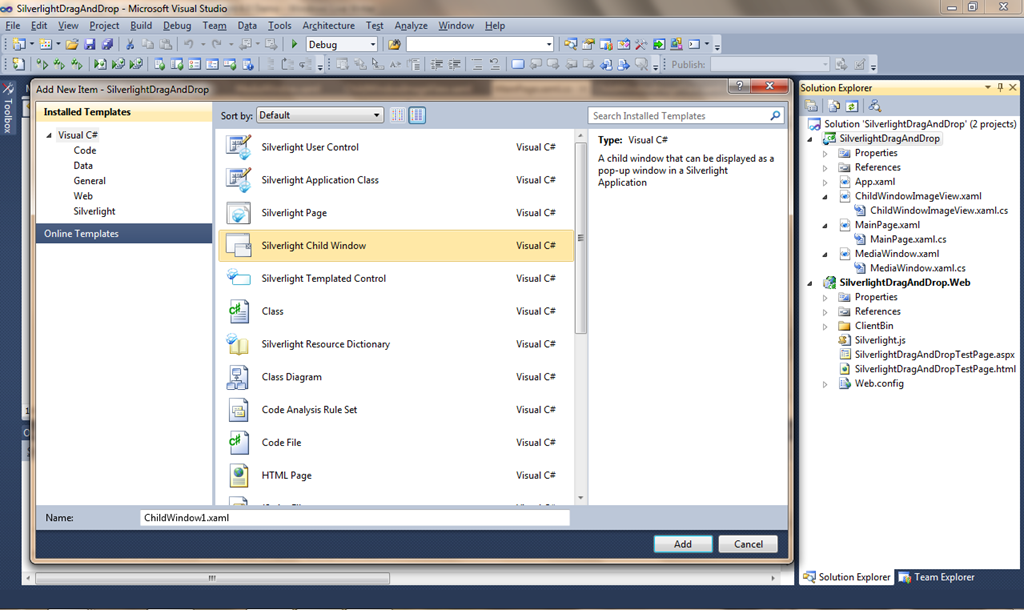
Các bạn chọn vào tên Project (DragAndDropSample) Click chuột Phải –> Add New Item –> ChildWindow và đặt tên cho nó là ChildWindowImageView:
Sau đó Design Giao diện :
như đoạn Code sau :
1: <controls:ChildWindow x:Class="SilverlightDragAndDrop.ChildWindowImageView"
2: xmlns="http://schemas.microsoft.com/winfx/2006/xaml/presentation"
3: xmlns:x="http://schemas.microsoft.com/winfx/2006/xaml"
4: xmlns:controls="clr-namespace:System.Windows.Controls;assembly=System.Windows.Controls"
5: Width="800" Height="600"
6: Title="ChildWindowImageView">
7: <Grid x:Name="LayoutRoot" Margin="2">
8: <Grid.RowDefinitions>
9: <RowDefinition Height="26"/>
10: <RowDefinition />
11: <RowDefinition Height="Auto" />
12: </Grid.RowDefinitions>
13: <TextBlock Grid.Row="0">Use Mouse wheel to zoom in or out</TextBlock>
14: <Image Name="ImageStage" Grid.Row="1"/>
15:
16: <StackPanel Grid.Row="2" HorizontalAlignment="Right" Orientation="Horizontal">
17: <Button Name="btnReset" Content="Reset Zoom" Width="75" Height="23" Click="btnReset_Click" HorizontalAlignment="Right" Margin="10"></Button>
18: <Button Name="btnClose" Content="Close" Width="75" Click="btnClose_Click" Height="23" HorizontalAlignment="Right" Margin="10"></Button>
19: </StackPanel>
20: </Grid>
21: </controls:ChildWindow>
và sau đó Xử lý sự kiện cho ChildWindowImageView:
1: using System;
2: using System.Collections.Generic;
3: using System.Linq;
4: using System.Net;
5: using System.Windows;
6: using System.Windows.Controls;
7: using System.Windows.Documents;
8: using System.Windows.Input;
9: using System.Windows.Media;
10: using System.Windows.Media.Animation;
11: using System.Windows.Shapes;
12:
13: namespace SilverlightDragAndDrop
14: {
15: public partial class ChildWindowImageView : ChildWindow
16: {
17: public MediaElement MediaPlayers { get; set; }
18: private ImageSource imgSource { get; set; }
19: ScaleTransform zoomTranSform = new ScaleTransform();
20: public ChildWindowImageView(ImageSource Source)
21: {
22: imgSource = Source;
23: InitializeComponent();
24: this.Loaded += new RoutedEventHandler(ChildWindowImageView_Loaded);
25: this.MouseWheel += new MouseWheelEventHandler(ChildWindowImageView_MouseWheel);
26: ImageStage.RenderTransform = zoomTranSform;
27:
28: }
29: void ChildWindowImageView_MouseWheel(object sender, MouseWheelEventArgs e)
30: {
31: zoomTranSform.CenterX = e.GetPosition(null).X;
32: zoomTranSform.CenterY = e.GetPosition(null).Y;
33: if (e.Delta > 0)
34: {
35: zoomTranSform.ScaleX += 0.05;
36: zoomTranSform.ScaleY += 0.05;
37: }
38: else {
39: zoomTranSform.ScaleX -= 0.05;
40: zoomTranSform.ScaleY -= 0.05;
41: }
42: }
43:
44: void ChildWindowImageView_Loaded(object sender, RoutedEventArgs e)
45: {
46: ImageStage.Source = imgSource;
47: }
48: private void btnClose_Click(object sender, RoutedEventArgs e)
49: {
50: this.DialogResult = true;
51: }
52: private void btnReset_Click(object sender, RoutedEventArgs e)
53: {
54: zoomTranSform.ScaleX = 1;
55: zoomTranSform.ScaleY = 1;
56: }
57:
58: }
59: }
60:
và bây giờ các bạn quay lại xử lý một tí trong Code Behind trang MainPage:
1: using System;
2: using System.Collections.Generic;
3: using System.Linq;
4: using System.Net;
5: using System.Windows;
6: using System.Windows.Controls;
7: using System.Windows.Documents;
8: using System.Windows.Input;
9: using System.Windows.Media;
10: using System.Windows.Media.Animation;
11: using System.Windows.Shapes;
12: using System.IO;
13: using System.Windows.Media.Imaging;
14: using System.Windows.Controls.Primitives;
15:
16: namespace SilverlightDragAndDrop
17: {
18: public partial class MainPage : UserControl
19: {
20: List<Image> images = new List<Image>();
21: private Popup tipPopup;
22: private MediaElement media;
23: DoubleAnimation Animation;
24: public MainPage()
25: {
26: InitializeComponent();
27: }
28: // Xử lý sự kiện Drop file từ phía Window vào
29: private void DropZongCanvas_Drop(object sender, DragEventArgs e)
30: {
31: if (e.Data == null) return;
32: IDataObject Data = e.Data;
33: FileInfo[] files = (FileInfo[])Data.GetData(DataFormats.FileDrop);
34: foreach (FileInfo item in files)
35: {
36: if (item.Extension.Trim() == ".png" || item.Extension.Trim() == ".PNG" || item.Extension.Trim() == ".JPG" || item.Extension.Trim() == ".jpg" || item.Extension.Trim() == ".bmp")
37: {
38: FileStream fs = item.OpenRead();
39: BitmapImage bitmap = new BitmapImage();
40: bitmap.SetSource(fs);
41:
42: Image img = new Image();
43: img.Source = bitmap;
44: img.Width = 120;
45: img.Width = 120;
46: img.Margin = new Thickness();
47: img.Stretch = Stretch.Uniform;
48: img.MouseLeftButtonDown += new MouseButtonEventHandler(img_MouseLeftButtonDown);
49: ImagineBox.Children.Add(img);
50: }
51: else if (item.Extension.Trim() == ".WMV" || item.Extension.Trim() == ".wmv")
52: {
53: FileStream fs = item.OpenRead();
54: MediaElement midi = new MediaElement();
55: midi.SetSource(fs);
56: media = midi;
57:
58: midi.Width = 120;
59: midi.Height = 120;
60: midi.Margin = new Thickness();
61: midi.Stretch = Stretch.Uniform;
62: midi.Play();
63:
64: midi.MouseLeftButtonDown += new MouseButtonEventHandler(midi_MouseLeftButtonDown);
65: ImagineBox.Children.Add(midi);
66: }
67: else
68: {
69: MessageBox.Show(item.Name + "is not support Image file");
70: }
71: }
72: }
73: void midi_MouseLeftButtonDown(object sender, MouseButtonEventArgs e)
74: {
75: btnPlay.Visibility = Visibility.Visible;
76: btnPause.Visibility = Visibility.Visible;
77: btnStop.Visibility = Visibility.Visible;
78: btnExit.Visibility = Visibility.Visible;
79: btnZoom.Visibility = Visibility.Visible;
80: btnPlay.Click += new RoutedEventHandler(btnPlay_Click);
81: btnPause.Click += new RoutedEventHandler(btnPause_Click);
82: btnExit.Click += new RoutedEventHandler(btnExit_Click);
83: btnZoom.Click += new RoutedEventHandler(btnZoom_Click);
84:
85: }
86: void btnZoom_Click(object sender, RoutedEventArgs e)
87: {
88: double A = media.Width;
89: double B = media.Height ;
90:
91: media.Width += media.Width ;
92: media.Height += media.Height;
93: media.HorizontalAlignment = HorizontalAlignment.Right;
94: media.VerticalAlignment = VerticalAlignment.Center;
95: }
96: void btnExit_Click(object sender, RoutedEventArgs e)
97: {
98: media.Width = 120;
99: media.Height = 120;
100: }
101: void btnPause_Click(object sender, RoutedEventArgs e)
102: {
103: media.Pause();
104: }
105: void btnPlay_Click(object sender, RoutedEventArgs e)
106: {
107: media.Play();
108: }
109: void img_MouseLeftButtonDown(object sender, MouseButtonEventArgs e)
110: {
111: ChildWindowImageView View = new ChildWindowImageView(((Image)sender).Source);
112: View.Show();
113: }
114: private void DropZongCanvas_DragOver(object sender, DragEventArgs e)
115: {
116: if (tipPopup == null)
117: {
118: String message = "Dar and Drop PNG AND JPG types Images";
119: Border border = new Border();
120: border.BorderBrush = new SolidColorBrush(Colors.Green);
121: border.BorderThickness = new Thickness(2.0);
122: border.Background = new SolidColorBrush(Colors.White);
123: TextBlock lbl = new TextBlock();
124: lbl.Margin = new Thickness(2);
125: border.Child = lbl;
126: tipPopup.Child = border;
127:
128:
129: }
130: tipPopup.VerticalOffset = e.GetPosition(null).Y;
131: tipPopup.HorizontalOffset = e.GetPosition(null).X;
132: tipPopup.IsOpen = true;
133: }
134: private void DropZongCanvas_DragLeave(object sender, DragEventArgs e)
135: {
136: if (tipPopup.IsOpen == true)
137: tipPopup.IsOpen = false;
138: }
139: }
140: }
 Pham Nguyen
anh có demo UploadImages của a Sang k?
Em ko bik email của a Sang
LikeLike
Demo của Sang e cần thì lên google mà search. nó ra cả đống
LikeLike
so dien thoai cua thao la 0972611325 , nguyen co len thi nha may nhe , ko thi pm qua nik nay dum thao nhe .nik thao ne bichthao_cogaitrunghoa .
LikeLike